Pricing guide · read 7 Oct 2026
MailerSend pricing: free for 500 emails a month, paid from $6.30
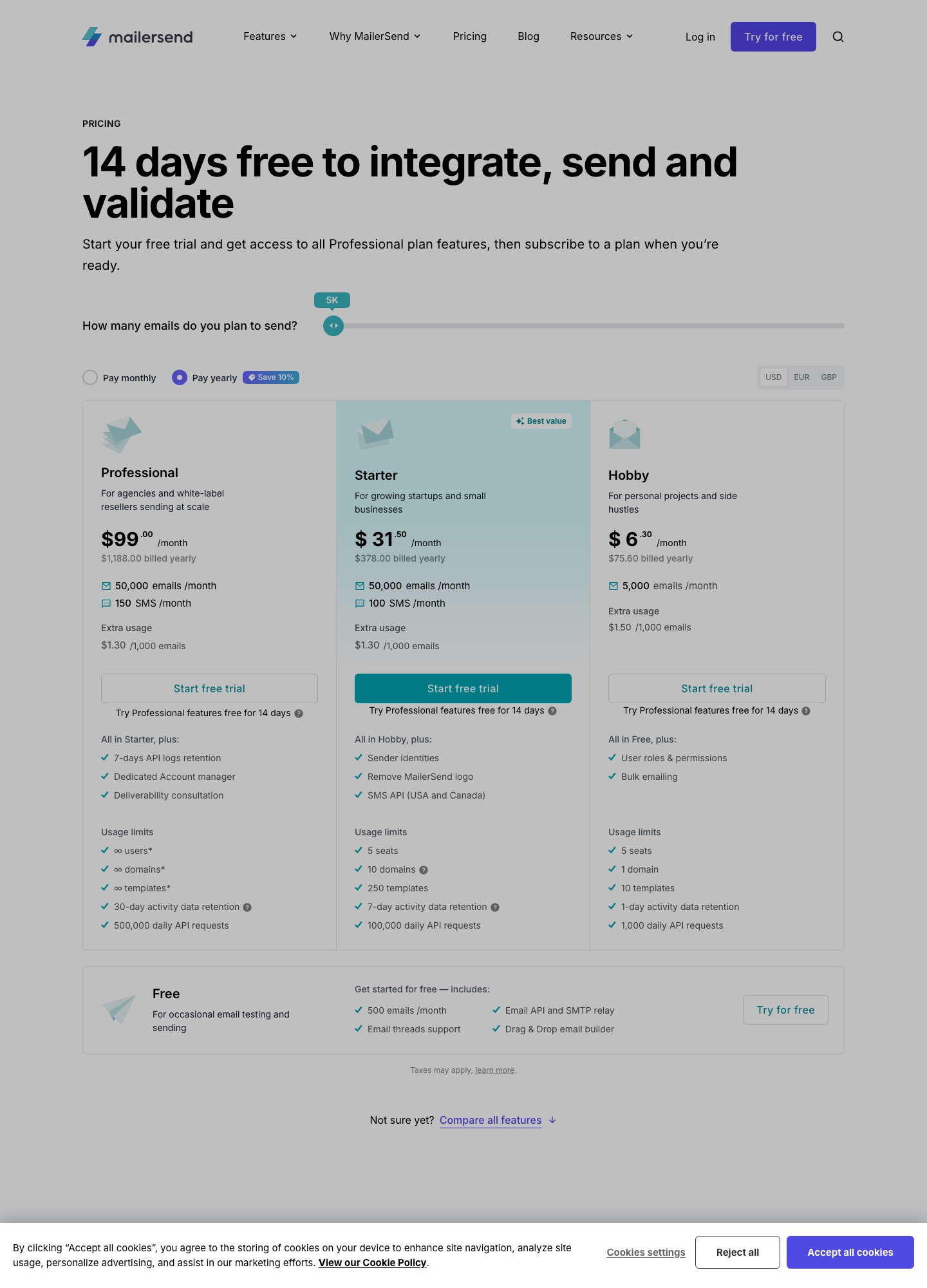
MailerSend's pricing page lists a free plan of 500 emails a month and three paid plans. Hobby is $6.30 a month for 5,000 emails, Starter is $31.50 for 50,000, and Professional is $99. Those are the figures with "Pay yearly" selected, which the page says saves 10%. Extra emails cost $1.50 per 1,000 on Hobby and $1.30 on Starter. The free plan requires a card on file, and its caps (one domain, one template, 100 API requests a day) matter more than the 500 emails.
| Plan | Per month (yearly billing) | Billed yearly | Emails | Domains · templates · seats | Activity retention · daily API requests |
|---|---|---|---|---|---|
| Free | $0 | n/a | 500/mo | 1 · 1 · 1 user plus an accountant role | 1 day · 100 |
| Hobby | $6.30 | $75.60 | 5,000/mo, extra $1.50 per 1k | 1 · 10 · 5 | 1 day · 1,000 |
| Starter | $31.50 | $378 | 50,000/mo, extra $1.30 per 1k | 10 · 250 · 5 | 7 days · 100,000 |
| Professional | $99 | $1,188 | 50,000/mo plus 150 SMS | Unlimited · unlimited · unlimited | 30 days · 500,000 |
What each step up actually adds
Reading down the page, the feature differences are small and the limit differences are large. Hobby adds user roles and permissions plus bulk emailing to the free plan. Starter adds sender identities, removal of the MailerSend logo and the SMS API for the USA and Canada, with 100 SMS a month. Professional adds seven days of API log retention, a dedicated account manager and a deliverability consultation. Everything else on the way up is a number: more domains, more templates, a longer activity window and a higher daily API ceiling.
That ordering makes the plan choice mostly arithmetic on your own setup. One brand sending receipts from one domain with a few templates fits Hobby. Two sending domains, or more than ten templates, pushes you to Starter regardless of how many emails you send, and a team that wants agencies' unlimited domains and users is the audience the page assigns to Professional ("for agencies and white-label resellers sending at scale").
Cost at 5,000, 50,000 and 100,000 emails
- 5,000 emails a month: $6.30 on Hobby with yearly billing ($75.60 a year). A 2,000-email overrun adds 2 x $1.50 = $3.00 for that month.
- 50,000 emails a month: $31.50 on Starter with yearly billing ($378 a year). Professional lists the same 50,000 emails at $99, so the extra $67.50 buys limits and support, not volume.
- 100,000 emails a month: $68, the figure in the page's own FAQ example of a Starter subscription that includes 100,000 emails. The same FAQ puts anything above the allowance at $1.30 per 1,000 emails.
Set against other tools in these guides, MailerSend's sticker sits in the middle. Resend's Pro plan lists $20 a month for 50,000 emails, though on a monthly basis, while SMTP2GO's Starter lists $10 a month for 10,000. MailerSend's argument is the template and domain allowances, not the lowest price per thousand.
The free plan and the 14-day trial
The page's FAQ says the free plan allows one template, one domain, one user (plus one accountant), one API token, one webhook and 100 daily requests, and that a card is required "to prevent abuse" with no charge on Free. Sent emails reset every 30 days. The separate trial gives all Professional features for 14 days with 500 emails a month, 100 API requests a day and one day of log retention, and a trial domain so you can test before touching DNS. When it ends you move to the Free plan; the page says you are never charged unless you upgrade yourself.
Billing rules worth knowing before you subscribe
- Upgrades and downgrades. Upgrades apply immediately; downgrades take effect at the end of the current billing cycle.
- Overage. If you pass your quota you keep sending and pay the per-1,000 rate. On cancellation the plan stays active to the end of the cycle, and a final charge covers any extra emails.
- Discounts. Nonprofits can ask for 30% off paid plans after starting the trial; it does not stack with the yearly discount.
- Add-ons. Email verification is open to all plans. Extra domain spaces cost $4.00 each, and extended activity retention starts at $5.00 for up to 365 days, which is the add-on to price if a one-day or seven-day log window is too short for debugging. Dedicated IPs are offered to Enterprise accounts sending over 100K emails a week.
- Payment. Cards and PayPal on all paid plans; bank transfer only on Professional and Enterprise.
MailerSend's AI features: an MCP server, not a writing tool
The three builder pages read for this guide, drag and drop, HTML and the template guide, list blocks, split testing, translations and automatic plain-text versions, and none lists AI text generation. MailerSend's AI offering is its MCP server, described as a way to connect an AI tool to your account so it can send and schedule emails, use your templates, create webhooks and report on low-performing emails. The page says MailerSend does not send your data to an AI tool and that the tool only reads or changes data when you instruct it.
The developer docs list the tools. They include send_email, which takes templates, personalization and attachments, send_bulk_email, create_template and update_template, the latter for API-created templates only. Setup is a remote server URL that you add to Claude, Claude Code or Gemini CLI, with a one-click install for VS Code. ChatGPT is listed as beta for Pro and Plus accounts on the web, with a warning that you may need different prompting to get the right tool called. The launch post from August 2025 called the server a beta. The pricing comparison table has an MCP server row, so check which plan columns carry it, and note that the page does not say whether MCP actions count against the daily API-request row (100 on Free, 1,000 on Hobby).
Getting AI-drafted copy into MailerSend
Which door you use depends on the builder, because the help pages are specific about it. The drag-and-drop builder cannot import HTML. Its FAQ points to the HTML builder, which imports an existing template by file upload or URL, and the template guide lists a Code block inside the drag-and-drop editor that rejects JavaScript and embed, frame, iframe, form, input, object and textarea elements. The HTML builder page does not describe pasting raw HTML into it, so if you work from a chatbot's output, saving it as an .html file and uploading it is the documented route.
To skip the builders, the email API accepts the content directly. This request matches the field names in the docs; from.email must sit on a verified domain or subdomain, and to takes between 1 and 50 recipients.
POST https://api.mailersend.com/v1/email
{
  "from": { "email": "hello@yourdomain.com", "name": "Your Name" },
  "to": [ { "email": "jane@example.com", "name": "Jane" } ],
  "subject": "Hello from {{company}}!",
  "text": "This is just a friendly hello from your friends at {{company}}.",
  "html": "<b>This is just a friendly hello from your friends at {{company}}.</b>",
  "personalization": [
    { "email": "jane@example.com", "data": { "company": "Example Ltd" } }
  ]
}
Whatever the chatbot wrote goes into html and text, and the personalization array fills variables per recipient. The trial domain lets you try a request like this without DNS changes, and you verify your own domain only if you decide to stay.
Who MailerSend suits, and who it does not
Pick it if your product sends receipts, resets and notifications from an API or SMTP relay, you want non-developers to edit templates in a visual builder, and you would like an MCP server that can create templates and report on sending. Starter at $31.50 is the sensible production plan once you pass one domain or ten templates.
Skip it if you need marketing automation or journeys, which the pricing page does not list among its features. For a developer-first API with a marketing tab read the Resend guide; for a stricter transactional focus see Postmark; for relay compatibility and subaccounts see SMTP2GO. The pricing index lists every sending tool, and the writing-assistant comparison covers the tools that draft the copy.
FAQ
Is MailerSend free?
There is a free plan with 500 emails a month, the email API and SMTP relay, an email threads support channel and the drag-and-drop builder. It needs a credit card on file for abuse prevention and caps you at one domain, one template and 100 daily API requests.
Are the prices shown monthly or yearly?
The figures in this guide are the monthly equivalents with "Pay yearly" selected, as captured on 7 October 2026, with the billed-yearly totals beside them. The page offers a Pay monthly toggle too, so confirm the figure for your billing choice before you buy.
What happens if I send more than my plan includes?
Sending continues, and extra emails are charged per 1,000: $1.50 on Hobby and $1.30 on Starter. The count resets every 30 days. If you overshoot month after month, compare the overage bill with the next plan's price instead of accepting it.
Can ChatGPT or Claude send email through MailerSend?
Through the MCP server, yes: the docs list sending, bulk sending and template tools, and Claude, Cursor, VS Code, Gemini CLI and ChatGPT (beta) can connect. You log in and authorize the connection, and the AI tool acts only when you give it a command.