Pricing guide · read 7 Oct 2026
Resend pricing: free for 3,000 emails, $20 at 50,000 and $35 at 100,000
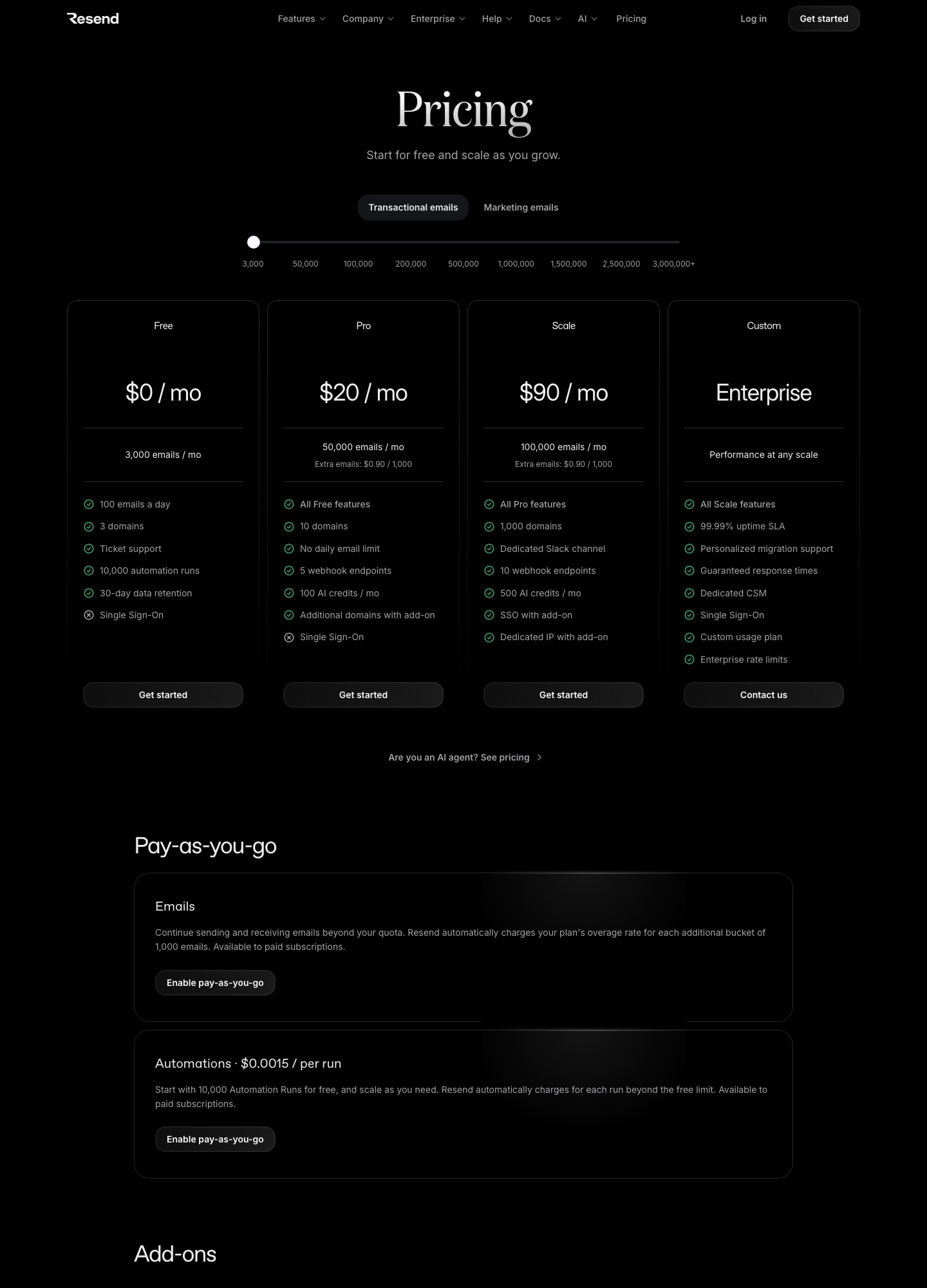
Resend's pricing page has two price lists. Transactional email reads Free at $0 for 3,000 emails a month with a cap of 100 a day, Pro at $20 for 50,000, and Scale at $90 for 100,000. The slider also read Pro at $35 for 100,000 emails, then Scale at $160 for 200,000, $350 for 500,000 and $650 for 1,000,000. Marketing email is priced by contacts instead: free at 1,000, then $40 at 5,000.
| Emails per month | Plan | Price per month | Per 1,000 emails |
|---|---|---|---|
| 3,000 | Free | $0 | $0 |
| 50,000 | Pro | $20 | $0.40 |
| 100,000 | Pro | $35 | $0.35 |
| 100,000 | Scale | $90 | $0.90 |
| 200,000 | Scale | $160 | $0.80 |
| 500,000 | Scale | $350 | $0.70 |
| 1,000,000 | Scale | $650 | $0.65 |
| 1,500,000 | Scale | $825 | $0.55 |
| 2,500,000 | Scale | $1,150 | $0.46 |
What each plan includes besides the volume
The plan cards put the real differences in the lists under the price. Free gives 3 domains, ticket support, 10,000 automation runs and 30-day data retention. Pro adds 10 domains, no daily email limit, 5 webhook endpoints and 100 AI credits a month. Scale adds 1,000 domains, a dedicated Slack channel, 10 webhook endpoints and 500 AI credits, and lists single sign-on and a dedicated IP as add-ons. Enterprise is quote-based and lists a 99.99 percent uptime SLA, a dedicated customer success manager and enterprise rate limits. Per the page's feature table, data retention reads 30 days on Free, Pro and Scale alike, so Scale does not buy a longer log window the way it does elsewhere.
Two billing statements from the FAQ shape how you can buy. Resend offers monthly plans only, with no annual discount, and it has no free trial but a free-forever plan. It also says all plans cost the same for every customer, so there is no non-profit or education price.
The 100-a-day wall, worked through
The free plan's monthly number looks roomy, but the daily cap decides what fits. Resend's usage limits page says the daily quota applies only to Free, resets at midnight UTC rather than on a rolling 24 hours, and counts both sent and received emails. Over the limit, the API answers 429 with daily_quota_exceeded or monthly_quota_exceeded.
Here is a case built on my own assumptions. A small app sends about 60 receipts and notifications a day, which is 1,800 a month, and an editor uses an AI assistant to write a weekly product update that goes to 500 customers through the emails API. The pricing FAQ says every recipient of an emails API send counts as one email. On update day the app sends 560 emails against a daily cap of 100, and across four weeks it sends 1,800 plus 2,000, or 3,800, against a monthly 3,000. Both limits break, so that team starts on Pro. A team whose largest burst stays under 100 a day, such as login codes for a prototype, can stay on Free.
Pro removes the daily limit. Past 50,000 emails, Pro keeps sending only if you turned on pay-as-you-go, which the FAQ says you enable in team settings under "Transactional Overages". Extra emails are then billed in buckets of 1,000 at the plan's overage rate, shown as $0.90 on Pro. Without it, you are notified and offered an upgrade. The FAQ also says there is no plan between Free and Pro.
Marketing: priced by contacts, with unlimited broadcasts
The Marketing tab swaps the email meter for a contact meter. The page says marketing plans are limited only by the number of contacts, that broadcasts can go only to existing contacts, and that broadcast sends do not count against your transactional quota. The free tier covers 1,000 contacts with unlimited broadcast sending, 10,000 automation runs and 3 segments.
| Contacts | Price per month | Per 1,000 contacts |
|---|---|---|
| 1,000 | $0 | $0 |
| 5,000 | $40 | $8.00 |
| 10,000 | $80 | $8.00 |
| 25,000 | $180 | $7.20 |
| 50,000 | $250 | $5.00 |
| 100,000 | $450 | $4.50 |
A subscriber list that is large and mostly quiet is what this ladder punishes. A 50,000-contact newsletter reads $250 here; compare the Loops guide, where the 49,989-subscriber stop reads $249 with unlimited sends included, and the Customer.io guide for profile-based pricing.
Add-ons and the small print
Extra domains are $20 a month for 100 more, available on Pro and Scale. A dedicated IP is $30 a month, and the page restricts it to customers exceeding 3,000 emails a day on the Scale plan, adding that Resend warms up, monitors and autoscales it. Single sign-on is $150 a month as a Scale add-on and is included on Enterprise. Automation runs beyond the free 10,000 cost $0.0015 each on paid plans with pay-as-you-go enabled, so a flow that fires 40,000 times in a month would add 30,000 × $0.0015, or $45, by that rate. Inbound emails also count toward the transactional quota.
One limit the pricing FAQ is careful to state: the API rate limit does not rise with the plan. The usage limits doc gives a default of 10 requests per second per team across all keys, and the FAQ points to the batch endpoint, which sends up to 100 emails in one request that counts as one request.
Templates, idempotency and batches for assistant-written mail
Picture a marketer who drafts an order-confirmation email in Copy.ai and hands it to a developer. Resend's templates guide says you build a template once, in the no-code editor, by API, CLI, MCP, React Email or an HTML file, then publish it and reference it when sending. The send call takes a template object with an id, or an alias, and a variables object:
await resend.emails.send({
  from: 'Acme <onboarding@resend.dev>',
  to: 'delivered@resend.dev',
  template: {
    id: 'order-confirmation',
    variables: {
      PRODUCT: 'Vintage Macintosh',
      PRICE: 499,
    },
  },
});
That sample is from the templates guide. The send email reference adds rules a drafting workflow must respect. With a template you cannot also send html, text or react, or the API returns a validation error. The from, subject and reply_to in your payload take precedence over the template's defaults. If the template uses variables you did not supply, the reference says the call throws a validation error. Variable names may use ASCII letters, digits and underscores up to 50 characters, string values are capped at 2,000 characters, and FIRST_NAME, LAST_NAME, EMAIL and UNSUBSCRIBE_URL are reserved. A single message accepts up to 50 recipients in the to field.
For retries, the idempotency page describes an Idempotency-Key HTTP header, which the SDKs expose as an idempotencyKey option and SMTP users set as a Resend-Idempotency-Key email header. Keys last 24 hours and can be 256 characters long. Reusing a key with a different payload returns a 409. The page suggests formatting keys as event type and entity ID, such as welcome-user/123456789. Batch sends, documented at the batch reference, take up to 100 emails per call and do not support attachments yet.
If the drafted piece is a newsletter, the pricing FAQ lays out a choice. Through the Broadcasts feature, Resend handles the unsubscribe link when your message includes the {{{RESEND_UNSUBSCRIBE_URL}}} placeholder. Through the emails API, you must supply your own visible unsubscribe link plus the List-Unsubscribe and List-Unsubscribe-Post headers, and each recipient counts against the transactional quota.
What Resend says about AI
This is the vendor in this guide with the most AI material in its own docs. The pricing page lists AI credits per month, 5 on Free, 100 on Pro and 500 on Scale, and an "AI assistant" row under customer support. It does not say what one credit buys. The template editor page states that the included AI assistant can compose common transactional emails, such as welcome messages and password resets. I make no claim about how good that output is.
The MCP server page describes a hosted server at mcp.resend.com that connects via OAuth, and a local resend-mcp package that takes an API key. Its listed tools cover sending and batch sending, templates, broadcasts, automations, contacts, domains and request logs, so an agent can create and publish a template, and the page's examples include debugging failed API requests through the logs. The pricing page itself carries a link reading "Are you an AI agent? See pricing". Treat connected agents as you would any API key holder: scope what they can do.
Who Resend suits
Choose it if a developer wants a small, documented API with templates, idempotency keys and batch sends, and your volume sits between 3,000 and 200,000 emails where the price steps are shallow. Teams already generating drafts through agents get the most from the MCP server and template tools.
Think twice if you need log retention beyond 30 days on any self-serve plan, or a per-message stream model like Postmark's, or EU hosting regions like the ones Mailgun's page lists. Compare MailerSend and SMTP2GO as other API-first options, and see the index for the full set.
FAQ
Is Resend free?
Yes, up to limits. The Free plan lists 3,000 emails a month, 100 a day, 3 domains and ticket support, and the FAQ says there is no free trial but a free-forever plan. The Marketing tab is free at 1,000 contacts.
How much does Resend cost at 100,000 emails?
The slider read $35 a month on Pro and $90 on Scale at 100,000 emails on 7 October 2026. Scale adds domains, a Slack channel and webhook endpoints, and makes a dedicated IP available as an add-on.
What happens if I go over my monthly emails on Pro?
With pay-as-you-go enabled you keep sending and are billed per 1,000 at the plan's overage rate. Without it, Resend notifies you and offers an upgrade.
Can an AI agent send email through Resend?
Resend documents a hosted MCP server whose tools send email, manage templates and broadcasts, and read request logs. Authorise it with OAuth or an API key, and scope the key.