Brevo pricing, read 7 Oct 2026
Brevo pricing: what the plans cost at 5k, 20k and 100k emails
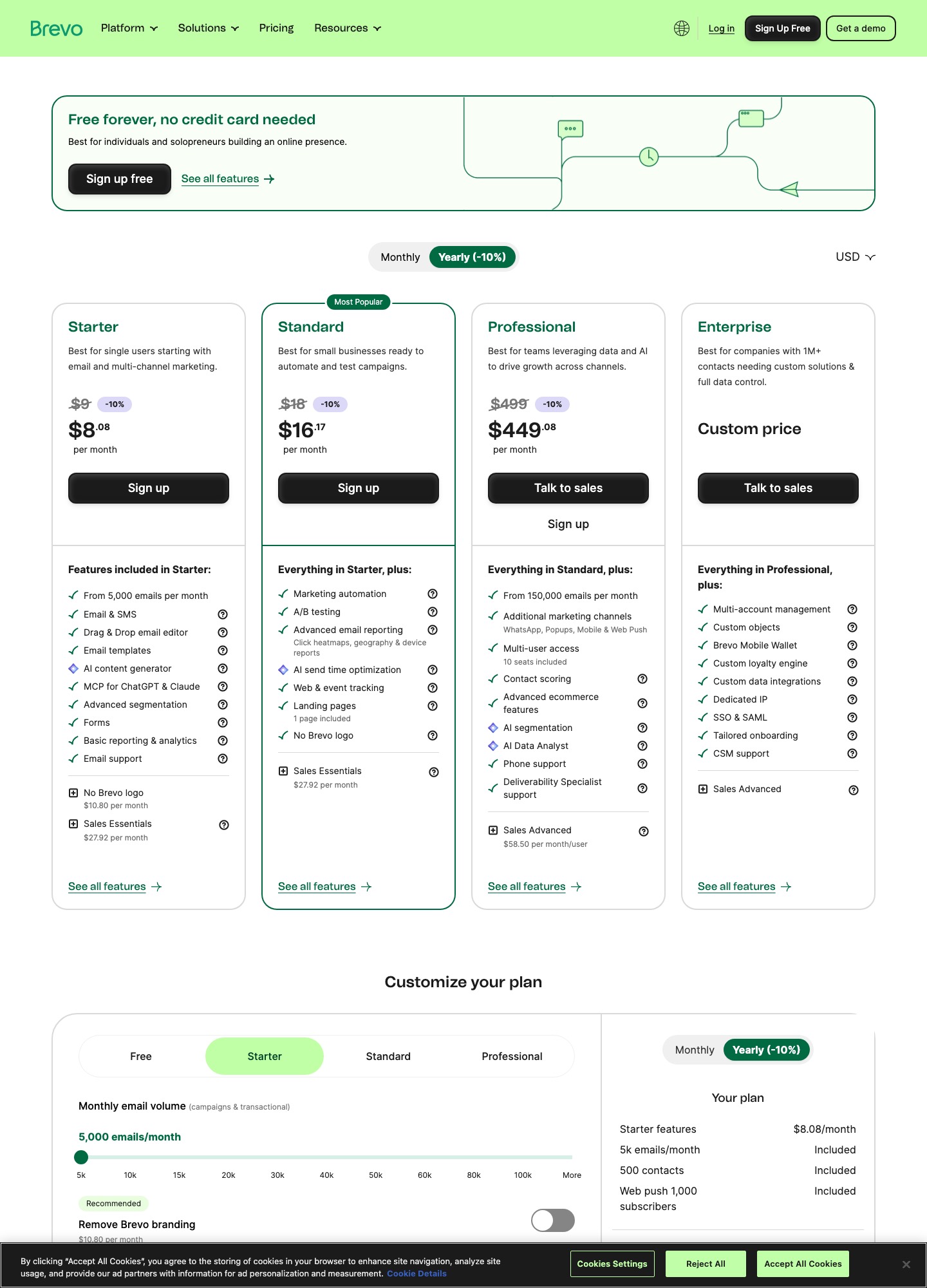
Brevo's pricing page lists a Free plan (300 emails a day), Starter from $9 a month, Standard from $18 and Professional from $499. You pick a monthly email volume and that choice sets both the price and how many contacts you may store. At 20,000 sends the monthly-billing readout is $32 on Starter and $69 on Standard. Below: the plan table, three worked volumes, billing traps, and what Brevo's own docs say about drafting copy with AI.
| Plan | Entry price | Sending | What changes |
|---|---|---|---|
| Free | $0 | 300 emails/day | Up to 100,000 stored contacts; automation only up to 2,000 contacts |
| Starter | $9/mo | 5,000/mo, no daily cap | First tier stores up to 500 contacts; Brevo logo stays unless you buy an add-on |
| Standard | $18/mo | 5,000/mo | Automation for unlimited contacts, A/B testing, AI send time optimization, advanced reports, priority email support |
| Professional | $499/mo | 150,000 to 10 million | 10 seats, up to 2 million contacts, AI segmentation, contact scoring, phone support |
| Enterprise | card reads from $2,499/mo | custom | Help article calls it a custom price; quote through sales |
Cost at three volumes
Brevo's slider on the pricing page shows a total for each monthly email volume. These are the monthly-billing readouts for Starter and Standard at the three volumes where the choice between plans is clearest. Starter and Standard share the same volume steps, so the gap between them is the price of automation and A/B testing at that size.
| Emails per month | Starter | Standard | Contacts the tier stores |
|---|---|---|---|
| 5,000 | $9 | $18 | 500 |
| 20,000 | $32 | $69 | 500,000 |
| 100,000 | $82 | $139 | 500,000 |
The slider also reads $17 (Starter) and $35 (Standard) at 10,000 emails, and $56 and $97 at 50,000. Professional has no slider readout on the page; its card starts at $499 a month, or $449.08 a month with the yearly toggle.
The right-hand column is the trap. Brevo's plans help article says the volume you choose also caps stored contacts: 5,000 emails stores up to 500 contacts, 10,000 stores up to 1,500, 15,000 stores up to 2,500, and 20,000 or more stores up to 500,000. A newsletter with 3,000 subscribers that goes out once a month needs only 3,000 sends, but 3,000 contacts exceeds the 2,500 that the 15,000 tier stores, so the plan that fits is the 20,000-email tier at $32 on Starter. If you exceed a contact limit on those first three tiers, the same article says Brevo upgrades you to the next tier automatically, and the cost rises with it.
The free plan, in practice
The help article describes the Free plan as free forever with no credit card: 300 daily email sends, storage for up to 100,000 contacts, one seat, a drag-and-drop editor, transactional email, outbound webhooks and email support. Multi-channel automation is included, but only up to 2,000 contacts. The cap is daily, not monthly, so 300 a day adds up to roughly 9,000 over a 30-day month only if you send every day; a single 5,000-recipient broadcast cannot go out on the free plan in one day.
For readers of this site the notable line in that list is Aura, Brevo's AI assistant. The pricing page's Starter card separately lists an "AI content generator" and "MCP for ChatGPT & Claude", so both features sit at the bottom of the ladder rather than behind the $499 tier.
Billing details that change the total
- Logo removal. The help article says Starter emails carry a "Sent by Brevo" logo in the footer, and the add-on to remove it costs $9 a month. The pricing page readout on 7 Oct showed $10.80 a month for the same add-on, so confirm the figure at checkout. Standard, Professional and Enterprise do not display the logo.
- Yearly billing. The help article gives a 10% discount for paying once a year, and says a yearly plan cannot be paused. Switching between monthly and yearly means cancelling first and choosing the new frequency after the period ends.
- Credits do not roll over. Each month's email credits are renewed on the billing date, and unused credits expire just before the new ones arrive. Prepaid email credits, sold in packs from 5,000 to 1 million, never expire and unlock Starter features, which suits a team that sends a few times a year.
- Add-ons. The help article lists extra Standard seats at $9 a month each (up to 3 users), Sales Essentials at $31, Sales Advanced at $64 and a dedicated IP at $251 a year on Professional and above.
Drafting with AI inside Brevo
Brevo's assistant is called Aura. Its overview article says the Marketing agent can write subject lines, generate or refine text, translate templates, and generate images and SMS copy. The content-generation article adds that generating a complete email design from a prompt is "still in beta" and released to some users first, that the prompt can include website URLs, and that translation covers 18 languages across all three editors. In the Drag & Drop editor you place the cursor in a text block, click the AI icon, choose Generate text or Refine text, and then pick Replace or Copy.
Two limits are stated in the docs. Aura's suggestions are editable and Brevo says it never changes campaign text without your action. And the Aura articles read for this guide do not mention a credit allowance or a plan restriction beyond Aura being listed under Free in the plans article, so whether generation is metered is something to confirm in your own account. You can switch individual Aura agents off in the control center.
Bringing in copy written elsewhere
A reader who drafts in Lavender, MailMaestro, Jasper, Copy.ai or a general chatbot ends up with text that has to enter Brevo somehow. The documented routes are:
- Paste into the drag-and-drop editor. Brevo's template article describes it as the no-code editor, and text copied from an assistant goes into its text blocks. The same article warns that a saved template keeps only the design, so sender, subject and preview text are set again at campaign level.
- HTML custom code. If the draft is already coded, Brevo's HTML editor article says you choose Start from scratch > HTML custom code, paste the file's code, and optionally save it as a template. It recommends linking images with
<img src>rather than embedding them. - Connect the assistant to Brevo. Brevo's MCP article describes generating an MCP API key under Settings > SMTP & API and adding it to Claude Desktop, Cursor, Windsurf or VS Code, after which you can ask the assistant to create a campaign from chat.
Who should pick Brevo, and who should not
Brevo suits a sender whose list is large relative to how often they mail it, because the bill follows send volume. A 25,000-contact list mailed once a month needs 25,000 sends, which lands on the 30,000 step: $39 on Starter or $79 on Standard. It also suits a team that wants transactional email, SMS and campaigns under one login. Pick Standard over Starter if you need A/B testing or automation across your whole list, since the plans article lists A/B testing and unlimited-contact automation only from Standard (Free and Starter automation stops at 2,000 contacts).
Skip it if your list is small but your sends are frequent. A 600-contact list mailed every day produces about 18,000 sends in 30 days, which lands on the 20,000 step at $32 on Starter, even though the contact count alone points at the $9 tier. For a subscriber-priced option with a bigger free list, compare MailerLite; for a contact-priced suite built around phone support and templates, Constant Contact; and if you mostly send app mail through an API, Resend is the cleaner fit.
FAQ
Does Brevo charge by contacts or by emails?
By monthly email volume. Brevo's help article says the volume you select sets the pricing tier, and the tier in turn sets how many contacts you can store. The two move together, so a large list can force a higher send tier even if you rarely mail it.
Is Brevo's AI assistant included in the free plan?
Brevo's plans help article lists Aura among the Free plan's features, and the pricing page marks an AI content generator on the Starter column as well. The Aura articles do not state a usage allowance, so look in your account for any metering before building a workflow on it.
Can I paste copy from another AI writing tool into a Brevo campaign?
Yes. Paste plain text into a text block in the Drag & Drop editor, or paste coded HTML into the HTML custom code editor. Brevo's template article says a saved template carries only the design, so set the subject line and sender again on each campaign.
Is yearly billing worth it?
It takes 10% off, which the pricing page shows as $8.08 for Starter and $16.17 for Standard at entry. The catch from the help article is that yearly plans cannot be paused and switching frequency requires cancelling first, so take it only once your volume tier has settled.