MailerLite pricing, read 7 Oct 2026
MailerLite pricing: Comfort vs Power at 1,000 to 25,000 subscribers
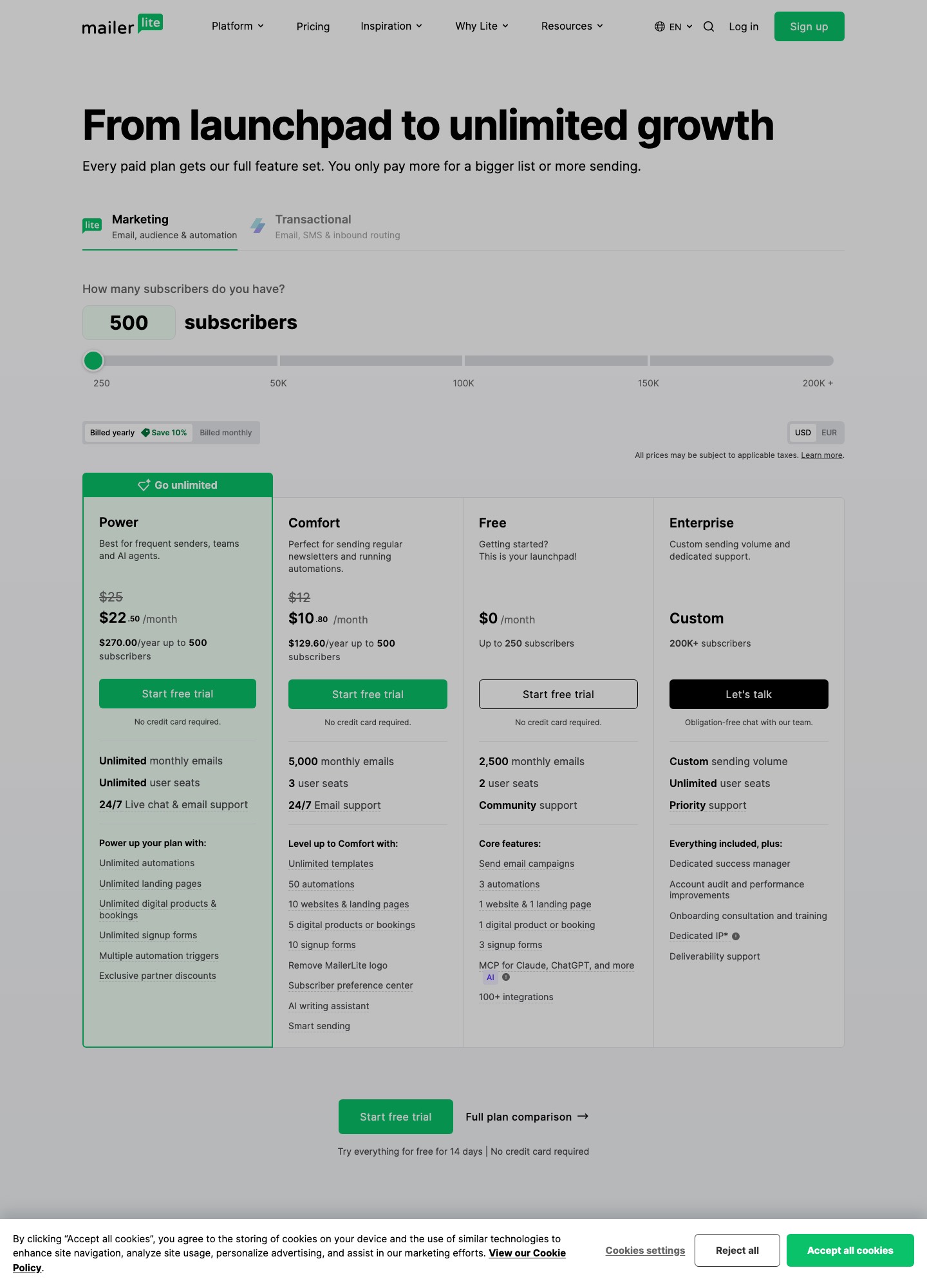
MailerLite's pricing page lists a Free plan (250 subscribers, 2,500 emails a month), Comfort from $12 a month and Power from $25, priced by subscriber count. At 5,000 subscribers the monthly-billing readout is $49 for Comfort and $69 for Power; at 10,000 it is $89 and $129. Comfort caps sends at ten times the subscriber tier, Power is unlimited, and the AI writing assistant is a paid-plan feature only.
| Plan | Monthly billing | Yearly billing, per month | Emails per month | Seats |
|---|---|---|---|---|
| Free | $0 | $0 | 2,500 | 2 |
| Comfort | $12 | $10.80 | 10x the tier ceiling | 3 |
| Power | $25 | $22.50 | Unlimited, fair use | Unlimited |
Read old comparisons with the rename in mind
MailerLite's plan update article says that in 2026 the Growing Business plan became Comfort and the Advanced plan became Power. Accounts move at their next renewal date or when someone changes plan by hand, and the article says any manual change made after June 16, 2026 applied the new structure immediately. The new structure also introduced limits that Growing Business did not have: Comfort allows 50 active automations, 10 forms, 10 landing pages and websites combined and 5 digital products, while Power is unlimited. A guide that still quotes Growing Business or Advanced prices is describing a retired layout.
What Comfort and Power cost as the list grows
The pricing page prices the same slider for both plans. These are the monthly-billing readouts at each stop it showed.
| Subscribers up to | Comfort | Power | Power premium | Comfort monthly email limit |
|---|---|---|---|---|
| 1,000 | $19 | $39 | $20 | 10,000 |
| 5,000 | $49 | $69 | $20 | 50,000 |
| 10,000 | $89 | $129 | $40 | 100,000 |
| 25,000 | $179 | $239 | $60 | 250,000 |
The last column applies the rule from the pricing page FAQ: Comfort gives 10 times the ceiling of your subscriber tier each month, whether you have 200 or 900 subscribers on the up-to-1,000 tier. So 5,000 subscribers on Comfort can be mailed ten times a month before sends run out; a daily sender needs about 150,000 a month at that list size, which exceeds 50,000 and points at Power, whose premium for that tier is in the fourth column.
How subscribers and sends are counted
The same FAQ describes a cumulative count. Any address that was active at any point in the billing cycle counts toward your limit, even if you delete it later, and the count resets on your billing anniversary. Delete a batch on April 1 with a billing date of April 5, and those addresses still count until April 4. When a paid account passes its tier, the limit rises automatically and the card is charged for the next tier. On Free, passing 250 active subscribers locks campaign and automation sending until you upgrade or remove subscribers. A send is one email to one subscriber, so a campaign to 500 people uses 500.
Other conditions from the page: annual-to-monthly switches only take effect once the annual plan has expired, downgrades wait for the cycle to end, nonprofits receive 30% off paid plans, and only one discount applies at a time. The 14-day trial gives every new account access to premium features, after which they are unavailable until you upgrade; data is not removed.
MailerLite's AI tools, plan by plan
MailerLite's HeyLite Intelligence overview includes a plan table. The AI writing assistant, AI-generated HTML emails and smart sending sit on Comfort and Power. The AI subject line generator is on all plans, with Free accounts getting a limited amount. AI-generated landing pages are Comfort and Power, with Free able to generate one page once. The MCP server is on all plans, although the overview notes the AI client you connect may have its own plan requirement, and the pricing page says that sending through the API or MCP is limited on Free and does not include sending.
The AI writing assistant article explains what that means in the editor. It says the assistant is powered by OpenAI GPT and built into the Drag & drop editor for campaigns, landing pages and pop-ups. Open a text block, click the AI text generator icon, choose a tone (Natural, Catchy, Professional or Persuasive) and a type (Title, Short paragraph, Long paragraph or call to action), then write a prompt of up to 200 characters. You can regenerate up to three times before you must change the prompt. In landing pages, a highlighted passage offers shorter, longer, improve writing and generate text.
Limits are stated in credits. Both the prompt and the response consume credits; the article's examples are about 200 credits for a 150-word prompt and about 1,000 for a 750-word response. It says Power accounts get the most credits, Comfort a limited amount, extra credits cannot be bought, and the way to get more is to move to Power. The article gives no credit total per plan, so the real allowance is visible only in your account. It also says that neither MailerLite nor OpenAI uses data submitted through the API to train its models.
Bringing your own copy or code
Text from Lavender, MailMaestro, Jasper, Copy.ai or a chatbot goes into a Drag & drop text block. For coded email, the custom HTML editor article sets out three starting points once you choose Start from scratch and then Custom HTML editor: Generate email with the AI agent, Import HTML code from a ZIP file, or Code from scratch, where you type or paste HTML into a blank editor with a live preview. The pricing page's own FAQ says the Free plan comes with all three editors: Drag & drop, Custom HTML and Simple.
The agent has stated limits. The article says it cannot yet build quizzes, countdown timers, social feeds or surveys, cannot pull live web data, and cannot generate, search for or analyze images; it also asks you to treat it as a starting point. The overview labels AI-generated HTML emails as beta and paid. Paste routes remain open on Free; the agent is not.
Who should pick MailerLite, and who should not
Pick it for a list in the hundreds to low thousands where you want a free plan that really sends (2,500 emails) and a clear step to paid. Pick Comfort if you send monthly or weekly and want the AI writing assistant at the lowest paid price; pick Power if you send daily, need more than 50 automations, or want live chat support. The plan update article adds that Comfort comes with email support, and that live chat is offered on Comfort only for 50,000-plus subscriber plans.
Do not treat it as a transactional sender. The pricing page splits Marketing and Transactional into two tabs, and app mail belongs to the second product line; our MailerSend guide is the nearest sibling for that job. If you need a bigger free list, Kit allows 10,000 subscribers on its free plan; if you want send-volume pricing instead of subscribers, read Brevo.
FAQ
Does MailerLite's free plan include AI writing?
Not the writing assistant. The HeyLite overview lists it for Comfort and Power. Free accounts do get a limited amount of the AI subject line generator and one AI-generated landing page.
What is the difference between Comfort and Power for a 5,000-subscriber list?
$49 versus $69 a month on the pricing slider. Power removes the 50,000-email monthly ceiling that Comfort has at that tier, lifts the automation, form and landing page limits, and gives the most AI credits.
Do deleted subscribers stop counting right away?
No. The pricing FAQ says an address active at any point in the cycle counts toward the limit even if deleted later, until your billing anniversary resets the count.
Can I import an HTML email I wrote elsewhere?
Yes. The custom HTML editor takes a ZIP import or pasted code, and the pricing page says Free includes that editor. Use the editor's preview and a test send to check how it renders before scheduling.