Constant Contact pricing, read 7 Oct 2026
Constant Contact pricing: Lite, Standard and Premium by contact band
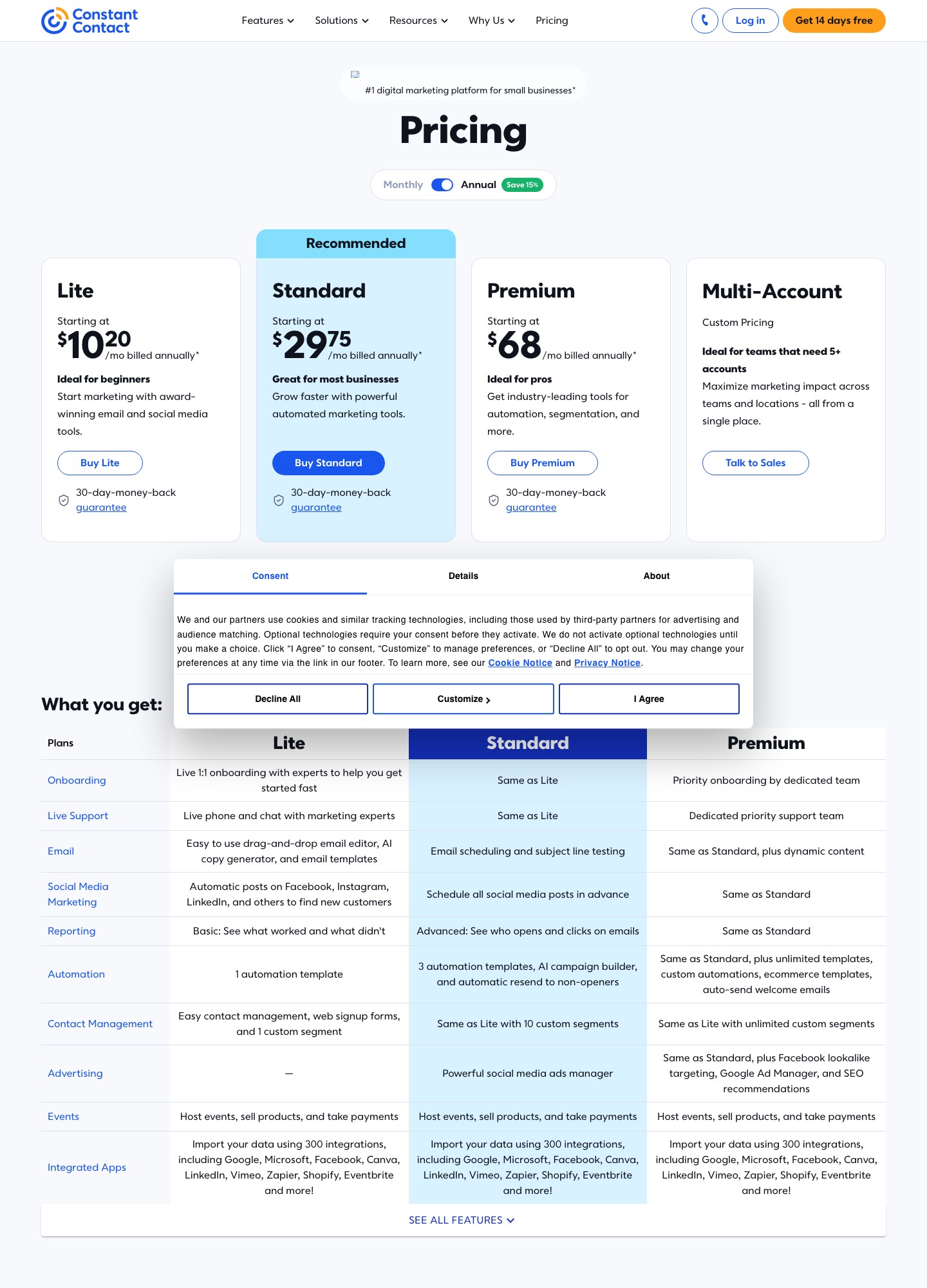
Constant Contact's pricing page starts Lite at $12 a month, Standard at $35 and Premium at $80, billed monthly, or $10.20, $29.75 and $68 a month when prepaid for a year. Those are the entry bands only: its fee schedule climbs to $102, $136 and $233.75 a month (annual billing) for 5,001-10,000 contacts. There is no free plan, only a trial. This guide shows the bands, the send overage, and how its AI writer and custom code editor handle copy drafted elsewhere.
| Plan | Monthly billing | Annual billing, per month | Monthly sends | Users |
|---|---|---|---|---|
| Lite | $12 | $10.20 | 10x contacts | 1 |
| Standard | $35 | $29.75 | 12x contacts | 3 |
| Premium | $80 | $68 | 24x contacts | Unlimited |
The fee schedule, band by band
The pricing page says your exact price depends on the number of contacts on your list. Behind its "See pricing tiers" link sits a fee schedule with one price per 5,000-contact step. Every figure in that schedule is labelled "billed annually", so the monthly equivalent below assumes you prepay twelve months; the page's FAQ says prepaying saves up to 15%.
| Contacts | Lite | Standard | Premium |
|---|---|---|---|
| 0-500 | $10.20 | $29.75 | $68 |
| 2,501-5,000 | $68 | $93.50 | $170 |
| 5,001-10,000 | $102 | $136 | $233.75 |
| 10,001-15,000 | $153 | $178.50 | $276.25 |
| 45,001-50,000 | $365.50 | $391 | $488.75 |
Above 50,000 contacts the schedule says to contact sales. A prepaid Standard plan at the 5,001-10,000 band therefore commits $136 a month, which is $1,632 over the year. The gap between plans narrows as the list grows: at 0-500 contacts Premium costs about 6.7 times Lite, but at 45,001-50,000 it costs about 1.3 times.
Send multipliers and the $0.002 overage
Each plan allows a multiple of your contact tier as monthly sends: 10x on Lite, 12x on Standard, 24x on Premium. The pricing FAQ says that going over does not stop delivery; extra sends are billed at $0.002 each, so $2 for every 1,000. That can change which plan is cheaper. Take the 2,501-5,000 band at its 5,000-contact top. A program sending 120,000 emails a month fits inside Premium's 24x allowance at $170. On Standard, the 60,000-send allowance is exhausted halfway, and the extra 60,000 sends cost $120 on top of $93.50, a total of $213.50. For a list mailed fewer than about twelve times a month, Standard's lower price wins; above that, the overage starts to erase it.
On the smallest band the same arithmetic is harsher. A Lite list at its 500-contact ceiling mailed daily for 30 days sends 15,000 emails against a 5,000 allowance, and the 10,000 extra sends cost $20 on a $10.20 or $12 plan.
The AI writer, and two statements about who gets it
Constant Contact's own pages disagree slightly about plan availability, so both are quoted here. The pricing page FAQ on AI features is blunt: access to the AI content generator comes with any paid plan, and its comparison table lists an "AI copy generator" under Lite and an "AI campaign builder" under Standard. The knowledge base article opens with a note that the generator is "not available in all Constant Contact plans" and that you may need to upgrade, and a June 2026 community post repeats that. Check the editor of your own account before assuming either.
The knowledge base describes several places it works. When selecting an email template you can enter a short description and, depending on the account, use the search bar or a Generated tab to produce a full email with content and images. Inside the editor, clicking a Text block shows Write with AI in the left panel; the features page says you can pick a tone and re-prompt. In the social post editor, AI > Summarize email turns an email into a caption. In the SMS editor an AI symbol offers options, and the same article adds that every customer can draft SMS but sending requires the add-on, with 500 free messages a month on Premium.
Pasting HTML written elsewhere
If you draft with Lavender, MailMaestro, Jasper, Copy.ai or a chatbot, plain text goes into a Text block like any other copy. For coded email, the custom code editor article gives the route: Channels > Emails > Create an email, then choose "Paste your own code" or "Paste HTML code". Depending on the account, a pop-up converts the pasted code into an editable template so you can finish in the standard editor.
The article lists what to expect. A tracking pixel is added to your code on send, external style sheets are not supported, styles at the top of the email are inlined automatically, iframes and forms are supported but often stripped by email clients, and JavaScript will likely not display. The developer guide adds limits: a custom code email cannot exceed 400 KB or contain the character combinations [#, ${ or <@. A community post says the same editor is reachable from the automation path builder through a "Build with HTML" option, so a coded email can sit inside an automated series. Neither the knowledge base article nor the developer guide names a plan restriction for custom code.
What you get for the money
The pricing page lists live phone and chat support on every plan, more than 300 integrations, and a 30-day money-back guarantee. It also offers a trial with no credit card; the button on the captured page reads "Get 14 days free". Lite includes a single automation template, Standard three templates plus the AI campaign builder and 10 custom segments, and Premium unlimited custom automations and segments, dynamic content and 500 SMS messages a month. SMS on Lite or Standard starts at $10 a month for 500 messages. Nonprofits can prepay for a 20% discount over six months or 30% over twelve, with paperwork confirmed before purchase and no discount on monthly billing.
Who should pick Constant Contact, and who should not
Choose it if you want a person on the phone, your list is a few thousand contacts, and the draft you bring from an AI writing assistant is text that goes into an editor. The fee schedule is easy to forecast, because the page publishes every band edge up to 50,000 contacts. Choose Standard if you need automation templates or the AI campaign builder.
Look elsewhere if you have no budget for a trial-only product or a dormant list. MailerLite and Kit both publish a free plan, Brevo prices by email volume, and Mailchimp is the other contact-priced suite with a documented paste-in-HTML route.
FAQ
Does Constant Contact have a free plan?
No. Its pricing page describes a paid platform with a free trial and no credit card needed, and a 30-day money-back guarantee on new plans. The cheapest paid entry is Lite at $12 a month, or $10.20 with annual prepay.
What happens if I send more than my plan allows?
Delivery continues, and the page says sends over the allowance are billed at $0.002 each, which is $2 per 1,000. Upgrading raises the multiplier from 10x to 12x or 24x of your contacts.
Is the AI content generator on every paid plan?
The pricing page says any paid plan, while the knowledge base says it is not in all plans and you may need to upgrade. Open a text block in your own editor to see whether Write with AI appears.
Can I upload an HTML email I wrote in another tool?
Yes, through the custom code editor. The knowledge base asks you to host images on a public server and recommends inline styles, and the developer guide caps the email at 400 KB. Send a test before scheduling.