Pricing guide · read 7 Oct 2026
Customer.io pricing: Essentials starts at $100 a month for 5,000 profiles
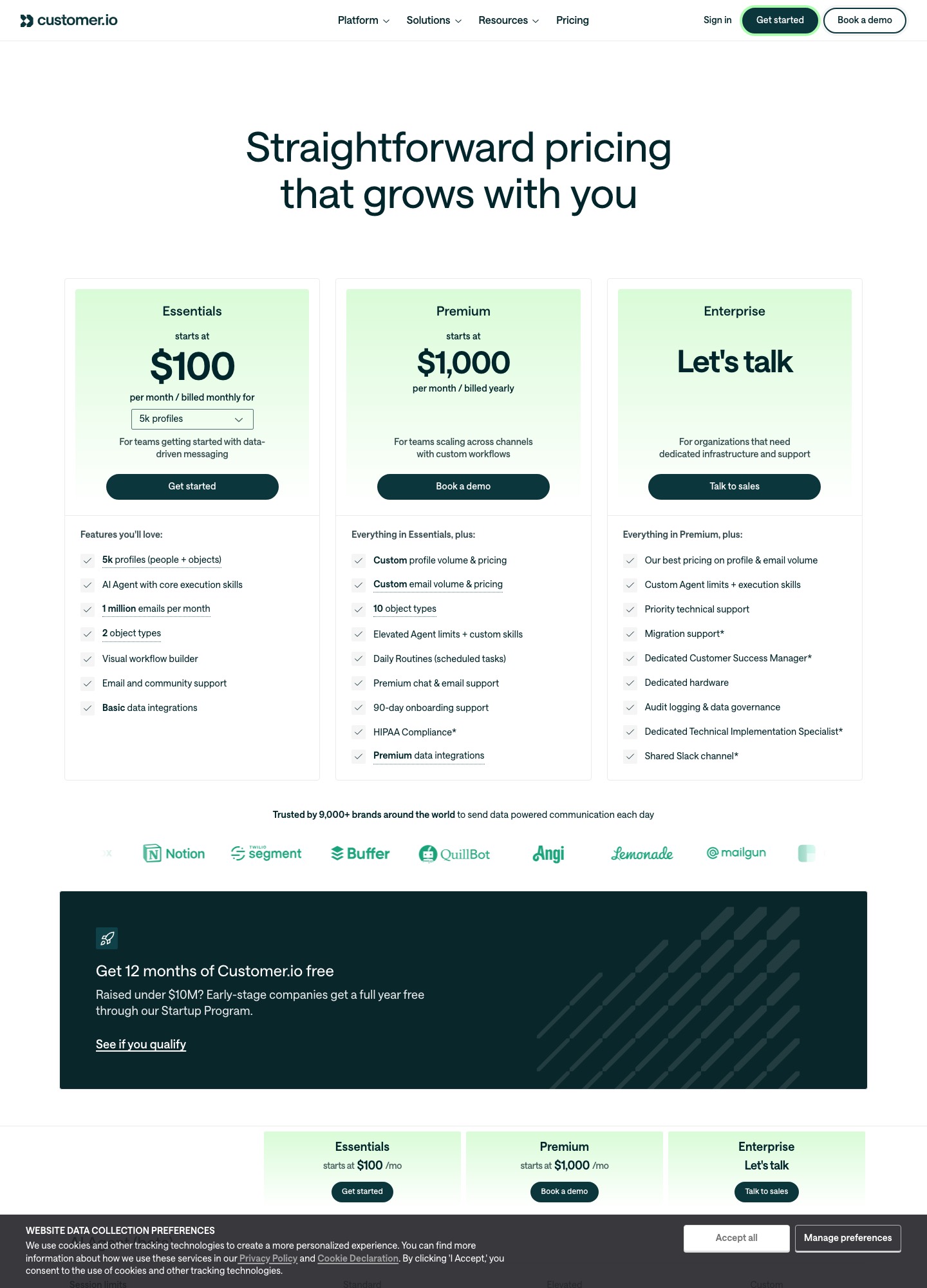
Customer.io's pricing page lists Essentials at $100 per month, billed monthly, for 5,000 profiles. Its profile selector then reads $145 at 10k, $235 at 20k, $325 at 30k, $415 at 40k and $505+ at 50k+, with one million emails a month included. Premium starts at $1,000 per month billed yearly, and Enterprise is quote-based ("Let's talk"). There is no permanent free plan, only a 12-month Startup Program for companies that raised under $10M. Everything below was read on 7 October 2026.
| Plan | Price shown | What the card lists | Billing |
|---|---|---|---|
| Essentials | From $100/mo at 5k profiles | 5k profiles (people + objects), AI Agent with core execution skills, 1 million emails per month, 2 object types, visual workflow builder, email and community support, basic data integrations | Monthly |
| Premium | From $1,000/mo | Custom profile and email volume and pricing, 10 object types, elevated Agent limits plus custom skills, daily Routines (scheduled tasks), premium chat and email support, 90-day onboarding support, HIPAA compliance, premium data integrations | Yearly |
| Enterprise | "Let's talk" (quote-based) | Best pricing on profile and email volume, custom Agent limits, priority technical support, dedicated hardware, audit logging and data governance, a dedicated Customer Success Manager | Custom |
| Startup Program | $0 for 12 months | For early-stage companies that raised under $10M; the page says to "see if you qualify" | Eligibility-based |
| Profiles | Price per month | Per 1,000 profiles |
|---|---|---|
| 5,000 | $100 | $20.00 |
| 10,000 | $145 | $14.50 |
| 20,000 | $235 | $11.75 |
| 30,000 | $325 | about $10.83 |
| 40,000 | $415 | about $10.38 |
| 50,000+ | $505+ | about $10.10 |
What counts as a profile, and what gets counted twice
Customer.io bills on profiles, and its billing documentation says people and objects count together toward the plan limit. A product that stores 18,000 people and 2,000 objects is therefore a 20,000-profile account, which is the $235 stop on the selector.
The same page describes a high-watermark model. A profile that exists at any point in the billing period counts for that month even if you delete it. The docs' own example starts a cycle with 3,000 profiles, adds 250 and deletes 50, ends with 3,200 and is billed for 3,250. Deleting a profile and adding it back in the same period counts it twice, and the page names integrations that quietly re-add deleted profiles as a common source of surprise bills: 100,000 profiles with 20,000 deleted and re-added the next day bills as 120,000.
Two details widen the count further. The Plans & Billing page counts profiles across every workspace in the account, including ones named test, dev or sandbox, and one person who exists in two workspaces is two profiles. If you plan to keep a staging workspace stocked with copies of real users, the profile count and the bill both grow with it.
Emails: one million included, then $0.12 per 1,000
The billing page sets overage at $0.009 per profile on Essentials ($0.004 on Premium and Enterprise) and $0.12 per 1,000 emails on every plan. Any email that reaches Customer.io's email service provider counts, including bounces and suppressed addresses. Overages are billed in arrears: on the first day of a period you pay that period's plan fee plus the overages from the one before.
A million emails is a high ceiling next to 5,000 profiles, so profile growth is normally the line that moves first on Essentials. At the published rate each extra 1,000 profiles is $9, and each extra 1,000 emails past the first million is $0.12. Push, in-app and webhook messages are unlimited under a fair-use ceiling of 60 times your plan's profile count per month; SMS is billed through Customer.io or Twilio, and WhatsApp by Meta or Twilio.
Three list sizes, three bills
- 5,000 profiles, $100 a month. A product with a few thousand users and a handful of objects. The million-email allowance never binds here, and the limit to watch is the profile cap.
- 20,000 profiles, $235 a month. The point where objects start to matter, because every subscription, workspace or device record you model as an object sits in the same count as your people.
- 50,000 profiles, $505+ a month. The selector shows a plus sign here and the page points toward Premium, whose entry price is $1,000 a month billed yearly. Above this stop the realistic path is a conversation with sales, not a slider.
What Essentials leaves out, and the sending ramp
The pricing page's comparison table lists managed deliverability as not included on Essentials and included on Premium and Enterprise. The plan-features article adds that Salesforce and HubSpot connections, the warehouse destinations (Amazon S3, Redshift, BigQuery, Snowflake and similar) and data replay are Premium or Enterprise features. Essentials also allows two extra workspaces, 30 days of audit logs and 250 test emails a day.
The same article describes a sending ramp that matters if your first campaign is a big one. New Essentials accounts start with a daily limit of 500 emails, move to 10,000 a day for established, healthy sending in about two weeks, and reach the plan's standard limit as a trusted sender after about six weeks. The limit is measured over a rolling 24-hour window, and when you reach it Customer.io stops sending until capacity frees up. The 14-day free trial, separately, allows up to 5,000 messages across all channels.
Customer.io's own AI: an agent, plus a separate credit meter
The Essentials card lists an "AI Agent with core execution skills"; Premium lists elevated Agent limits and custom skills, and Enterprise lists custom limits. The agent documentation says it can create segments, automations, one-time sends and Design Studio emails, and its sample prompts include drafting a re-engagement email for people who have not opened a message in 60 days, in a casual tone. You can upload a brand guide as PDF or Markdown and ask it to remember the contents, and the business-context settings include a tone-and-voice slider. The docs do not give a per-plan prompt cap, so "core" versus "elevated" is all the pricing page says about limits.
Guardrails are documented in detail. By default the agent cannot edit live automations, one-time sends or segments in use, and it does not send live messages on its own. An account admin can turn on "Edit live data", after which you choose between asking for approval on each change or an auto mode where a separate model approves changes. The AI settings article also says Customer.io does not use your customer data to train AI models, that the in-app AI features use Google's Gemini models, and that admins can switch the whole AI layer off.
Credits are a different meter. The AI credits page says only LLM actions, the workflow steps that send data through a model and store the result, consume credits. The agent, segment builder, content analysis and in-app message suggestions do not. Extra credits cost $10 per 100,000, sold in packs of 100,000. Trial plans get no credits, running a test prompt is free, and when credits run out an LLM action falls back to its configured fallback value so the automation keeps running. Burn rates are quoted relative to Gemini 2.5 Flash Lite, from about 2.5x for lighter models to about 50x for the largest Anthropic ones. The page does not state an included allowance per plan.
Getting copy drafted elsewhere into Customer.io
If you write with Lavender, MailMaestro, Jasper, Copy.ai or a general chatbot, the question is how the text gets into a send. Customer.io's documentation describes five routes.
| Route | What the docs say | Watch for |
|---|---|---|
| Paste into the code editor | Design Studio overview: to import an email or paste in HTML, use the code editor | HTML from elsewhere may not be fully editable in the visual editor until you wrap text in <x-edit-text> |
| Upload or forward | File manager: upload .html, .htm or .eml, or forward an email to your workspace's import address | Forwarded mail lands in a folder called "Imported from Inbound Email", named from the subject line |
| Design Studio API | API guide: create an email from your own HTML, test it, link it to a workflow, publish changes | Images need public URLs (no base64), HTML must be JSON-escaped, and publishing is one email at a time |
| Upload to the agent | Agent docs: upload an existing HTML template and ask it to help rebuild it in Customer.io | Uploads cap at 5 MB for images and 10 MB for documents |
| MCP or CLI | AI overview: connect Claude, ChatGPT or Cursor through MCP, or use the CLI from a terminal tool | MCP has its own on/off toggle and its own "edit live data" switch; the CLI follows its service-account token instead |
A workable path for a chatbot draft, using only what those pages describe: ask the chatbot for HTML, paste it into the code editor, swap placeholder names for Liquid such as {{customer.first_name}}, and add {% unsubscribe_url %}, which the API guide calls required for marketing email under rules such as CAN-SPAM and GDPR. Most email clients strip style blocks, so inline the CSS or switch on the CSS inlining transformer, use the Text tab's Generate button for a plain-text version, then preview with sample data and send a test. The editor's developer tools list a link validator, an image validator, SpamAssassin and an accessibility checker.
For multilingual drafts, the docs say "Auto-translate with AI" covers body text, subject lines, preheader text and image alt text. It does not translate Liquid, snippets, or text inside custom components unless you detach the component first.
Who should pick Customer.io, and who should look elsewhere
Pick it if the email you draft is one stage of a longer journey: events from your product trigger branches, push or in-app messages share the same workflow, and someone on the team will maintain object types and attributes. The profile meter suits that kind of data-heavy account, and the Startup Program can make the first year free for eligible companies.
Look elsewhere if you mainly want to send AI-drafted newsletters to a large list. Profile-based pricing with a $100 floor is more than a plain newsletter needs. Writers who send to subscribers should read the guide to the creator-focused tool Kit first. For a small SaaS that wants simple event-triggered email, the Loops guide shows a per-subscriber price of $99 at 9,998 subscribers against Customer.io's $145 at 10k profiles, though the two meters count different things. If all you need is an API that delivers messages your app already built, the Resend guide is closer to that job. The method page explains how these guides are read and dated, and the writing-assistant comparison covers the drafting tools themselves.
FAQ
Does Customer.io have a free plan?
The pricing page lists no permanent free plan. It offers a Startup Program that gives early-stage companies that raised under $10M a full year free, and the docs describe a separate 14-day trial with up to 5,000 messages. After either, Essentials starts at $100 a month for 5,000 profiles.
Do deleted profiles still cost money?
Within the same billing period, yes. The billing docs say a profile that existed at any point in the period counts toward that month's bill even if you delete it. The next month starts from the profiles you actually still have.
Do I pay extra for the AI agent?
The pricing page lists the agent inside Essentials, with elevated limits on Premium. The docs say the agent does not consume AI credits. Only LLM actions inside automations do, at $10 per 100,000 extra credits.
Is EU data hosting an add-on?
The pricing page's comparison table lists US and EU data centers as included on all three plans, and Customer.io publishes a data processing agreement at customer.io/legal/dpa. One AI caveat from the credits docs: accounts in the EU data center use a regional model endpoint that may not support the newest models.