Pricing guide · read 7 Oct 2026
Loops pricing: free up to 4,000 sends, then $99 a month at 10,000 subscribers
Loops's pricing page lists a free Early Stage plan with unlimited contacts but only 4,000 sends in any rolling 30 days, to your 1,000 newest contacts. Paid Growing Audience plans are priced by subscribed contacts, with unlimited sends and transactional email included. The slider read $48 at 4,788 subscribers, $99 at 9,998, $198 at 24,339 and $249 at 49,989 on 7 October 2026. Free emails carry a small "Powered by Loops" footer.
| Plan | Price | Sending | Other terms |
|---|---|---|---|
| Early Stage | $0 | Up to 4,000 sends in any rolling 30 days, to the 1,000 newest contacts; marketing and transactional sends are counted together | Up to 10 emails per second, all features included, small "Powered by Loops" footer |
| Growing Audience | From $48 per month at 4,788 subscribers | Unlimited sends to subscribers; transactional sends to users outside your audience | Up to 1,000 emails per second, no Loops branding, no per-seat fee |
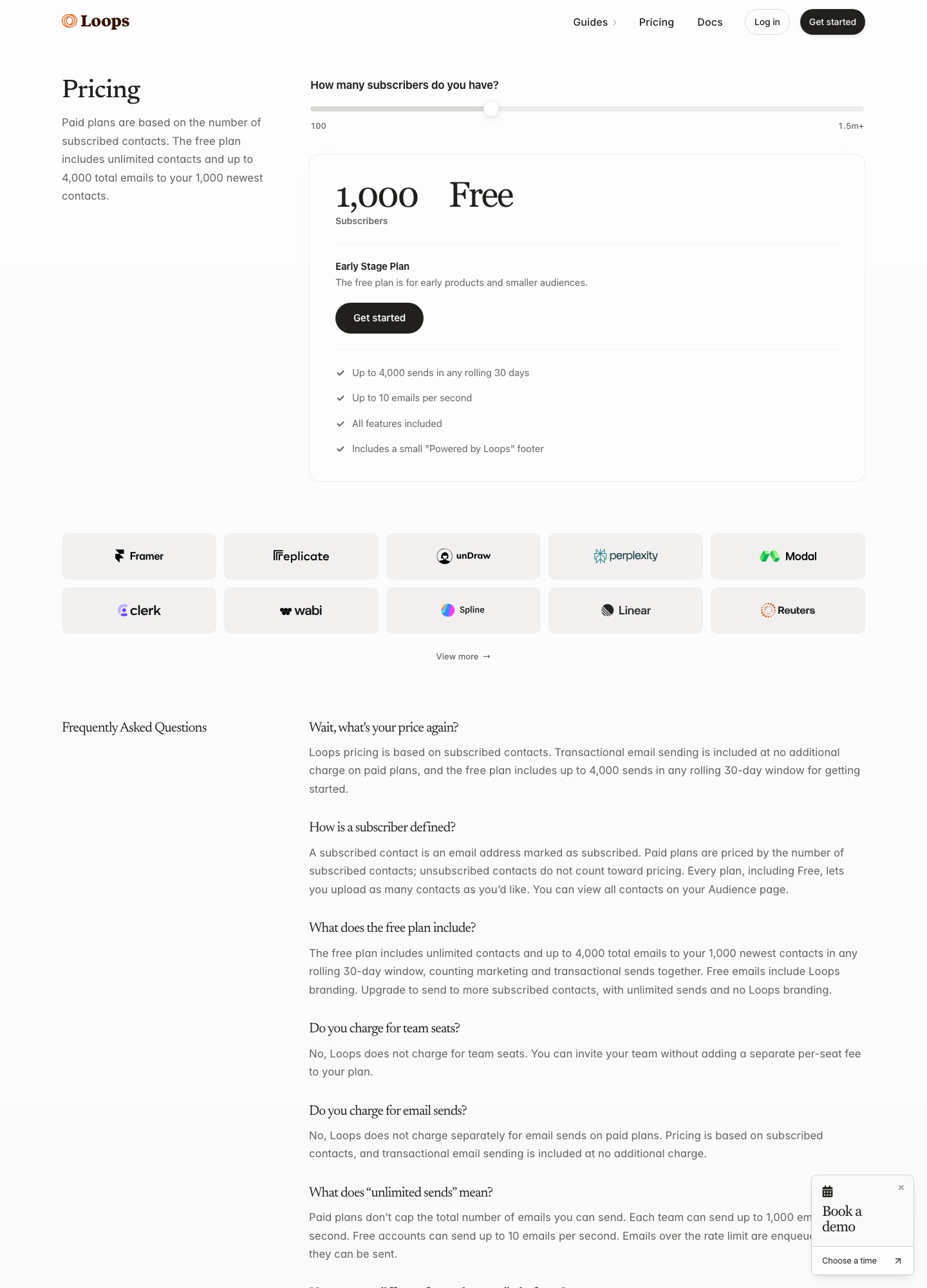
The paid slider, stop by stop
Loops has no plan names above the free tier. One Growing Audience plan moves along a subscriber slider, and the price on it is the whole bill, because sends are not metered. These are the four readouts taken on 7 October 2026, with the exact subscriber count the slider showed at each stop.
| Subscribers shown | Price per month | Per 1,000 subscribers |
|---|---|---|
| 4,788 | $48 | about $10.03 |
| 9,998 | $99 | about $9.90 |
| 24,339 | $198 | about $8.14 |
| 49,989 | $249 | about $4.98 |
The curve is not linear. Between roughly 5,000 and 10,000 subscribers the cost per thousand barely moves, then it drops by about half between 10,000 and 50,000. A list that is going to pass 25,000 gets noticeably cheaper per head than one that stays near 5,000. Only these four stops were read, so a figure for, say, 15,000 subscribers has to be taken off the slider itself rather than guessed from the table.
How the free plan's send window behaves
The free plan accepts as many contacts as you want to upload, but emails only go to the 1,000 newest of them, and the 4,000-send allowance is counted over any rolling 30 days rather than a calendar month. Marketing and transactional emails draw from the same pool.
Here is how that adds up under assumptions of the editor's own. Say you hold 800 contacts, 300 new people sign up in a month and each receives a three-email welcome sequence (900 sends), and you also mail a product update to all 800 contacts every week (4 x 800 = 3,200 sends). That is 4,100 sends, already over the 4,000 allowance, and the receipts or password resets you send in the same window would count as well. Because the window rolls, a heavy launch week keeps counting against you for 30 days afterwards.
Free is also rate-limited to 10 emails per second, with excess emails queued rather than rejected. The paid plan lifts that to 1,000 per second, so a 50,000-recipient campaign needs at least 50 seconds of sending at the paid rate.
Who counts as a subscriber
The pricing page defines a subscribed contact as an email address marked as subscribed. Paid plans are priced by that number, and unsubscribed contacts do not count toward pricing. Every plan, free included, lets you upload as many contacts as you like, so a list full of lapsed addresses costs nothing until they are marked subscribed. The page also says Loops does not charge for team seats, and that transactional email is included on paid plans with no separate charge.
Pasting AI-written drafts into the Loops editor
Loops's editor is built around typed text rather than an AI generator. The editor page lists writing mode, themes, personalization, reusable blocks and Markdown shortcuts, and it does not list a text-generation feature. What it does give you is a clean path for text that was written somewhere else. The Markdown page says to paste Markdown with Cmd+Shift+V on Mac or Ctrl+Shift+V on Windows and it converts into native editor blocks, with two custom tags for layouts the Markdown syntax lacks.
<loops-button href="https://loops.so"> Subscribe </loops-button>That snippet is the button example from the docs; columns work the same way with <loops-columns> wrapping <loops-column-item> blocks. If your writing assistant can export Markdown, that is the lowest-friction route into a campaign or workflow email. If it only produces rich text, paste it in the normal way and the editor's formatting panel takes over.
MJML uploads for fully designed emails
For emails designed outside Loops, the upload page describes importing MJML as a ZIP containing index.mjml plus an img folder. The file must include an unsubscribe link, written as {unsubscribe_link} inside an anchor's href, and personalization uses tags such as {firstName}, with event-triggered workflows using an EVENT_PROPERTY: prefix and transactional emails a DATA_VARIABLE: prefix. The page walks through exporting from the Emailify and Email Love Figma plugins, and states that Loops recommends its editor, or the API with LMX, over MJML import as the easiest and most reliable way to build emails.
LMX, draft campaigns and agent access
LMX is Loops Markup Language, an XML-based format for email content with tags such as <H1>, <Paragraph> and <Button>. The LMX page says it sits between the API and the editor, so an email can be edited in either place, and that you can keep LMX in your codebase and push updates to draft messages. Creating a campaign through the API needs only a name; the campaign examples say to keep the returned content revision ID and pass it as expectedRevisionId on updates to avoid 409 conflicts from stale revisions.
Loops's agents page frames this as drafts that an agent creates and a person reviews: it says you can create draft campaigns, content and all, from the API, then review and send from the dashboard. The MCP server page lists contacts, mailing lists, events, transactional sends, campaigns, workflows and email content among the things a connected AI tool can work with, and gives connection steps for ChatGPT, Claude, Claude Code, Codex CLI and Amp. You sign in to Loops in a browser to authorize. The pricing page says the free plan includes all features, but it does not name MCP, the API or LMX, so confirm what a free account can reach before building around it.
The one AI feature the docs describe inside the product is translation. The translation page says you enable it under Settings, then Sending, and translate a workflow branch with one click. It covers subjects, preview text, button text, link text and image alt text, and it skips URLs, dynamic content, data variables and contact or event properties.
Where Loops fits, and where to look instead
Choose Loops if you run a software product with a modest, active audience and send a lot per person: onboarding sequences, product events, transactional mail and the occasional update. Unlimited sends mean a chatty workflow costs the same as a quiet one, and the free plan is a real starting point as long as you stay inside 4,000 sends.
Look elsewhere if your list is big and mostly dormant, or if you send rarely. The $249 stop at 49,989 subscribers is the price of being on the list, whether or not you mail it. At that size Resend's Marketing tab reads $250 at 50,000 contacts and $80 at 10,000 against Loops's $99 at 9,998, so the two are close on a per-contact basis and differ mostly in product shape. Newsletter-first senders should read the Kit guide. Teams that need profile and object data across several channels belong with Customer.io, which lists $145 at 10k profiles. The method page explains how we read and date these numbers, and the homepage comparison covers the AI writing assistants themselves.
FAQ
Is the Loops free plan really free?
Yes, with limits. The pricing page lists up to 4,000 sends in any rolling 30 days to your 1,000 newest contacts, 10 emails per second, all features, and a small "Powered by Loops" footer. It does not ask for a card to start.
Do unsubscribed contacts count toward the price?
No. The pricing page says paid plans are priced by subscribed contacts and that unsubscribed contacts do not count toward pricing. Contacts you upload but never mark as subscribed do not raise the price either.
Do I pay extra for transactional email?
The page says transactional sending is included at no additional charge on paid plans. On the free plan, transactional and marketing sends share the same 4,000-send window.
Can I write Loops emails with ChatGPT or Claude?
Loops documents two routes. You can paste Markdown into the editor, or connect an AI tool through its MCP server, which can edit email content and create campaigns. Drafts created through the API are left for you to review and send from the dashboard.