Kit pricing, read 7 Oct 2026
Kit pricing: the free plan to 10,000 subscribers, then Creator and Pro
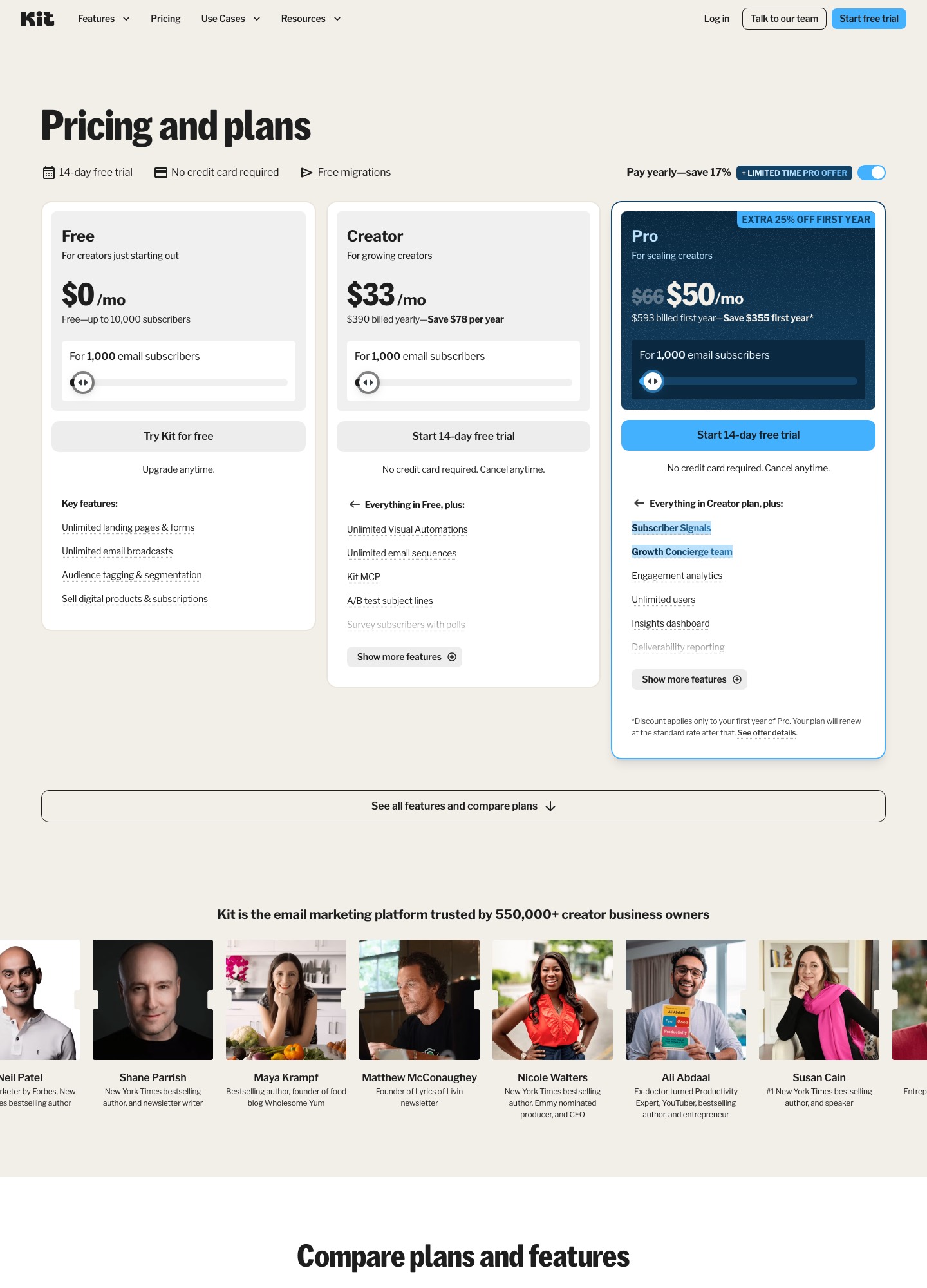
Kit's pricing page lists a Free plan for up to 10,000 subscribers, Creator at $33 a month (shown with yearly billing, $390 a year) for 1,000 subscribers, and Pro at $66. At 10,000 subscribers the page reads $116 for Creator and $158 for Pro. The free plan sends unlimited broadcasts; automations and sequences start on Creator. Kit's AI features split into subject-line help inside the editor and AI Connectors that let Claude or ChatGPT draft for you, and the connectors require a paid plan.
| Plan | Price at 1,000 subscribers | What it adds |
|---|---|---|
| Free | $0, up to 10,000 subscribers | Unlimited landing pages, forms and email broadcasts; tagging and segmentation; selling digital products and subscriptions |
| Creator | $33/mo, $390 billed yearly | Unlimited Visual Automations and email sequences, A/B test subject lines, Kit branding removal, Kit MCP, 24/7 email and chat support |
| Pro | $66/mo ($50 first-year promotion) | Subscriber Signals, unlimited users, engagement analytics, insights dashboard, deliverability reporting |
Creator and Pro as the list grows
Kit's slider prices the same plan at larger subscriber counts. The figures below are the ones the page showed for each stop, with the yearly toggle on. The Pro price at 5,000 subscribers was not among the stops read, so it is blank rather than estimated.
| Subscribers | Creator | Pro |
|---|---|---|
| 1,000 | $33 | $66 |
| 5,000 | $75 | not read |
| 10,000 | $116 | $158 |
| 25,000 | $166 | $233 |
The yearly offer is spelled out in Kit's billing article: annual plans give twelve months for the price of ten, which matches $390 against the $39 a month that the same help center quotes for a 1,000-subscriber Creator plan billed monthly. The article also says refunds beyond the standard 30 days are not offered on annual plans.
What the free plan leaves out
The pricing page says Free covers up to 10,000 subscribers with unlimited landing pages, forms and broadcasts. Kit's Newsletter Plan article adds an overview: unlimited email sends, A/B testing and conditional content, one basic visual automation with one email sequence, a newsletter site, and Creator Network recommendations that you can switch off. It describes the paid plans as the place for unlimited Visual Automations and sequences, Rules, integrations and RSS campaigns. The pricing page's Creator card lists Kit branding removal, which implies that free sends carry Kit branding. Free support requests are answered, in the article's words, within 24 to 72 hours.
Pass 10,000 subscribers and the same article says you need a paid plan to keep sending email.
What counts toward the bill
Kit bills on confirmed subscribers, not on emails sent or features used. Its subscriber status article says unconfirmed, unsubscribed, complained, hard-bounced and blocked subscribers are excluded from the billing total, while cold subscribers, meaning confirmed ones who have not engaged for some time, are included. A soft bounce on a single email does not remove anyone from the count. Each plan is split into subscriber tiers; when you pass one, Kit moves you up automatically. The billing article's worked example has a Creator account on $39 a month for up to 1,000 subscribers upgraded to the $59 tier ten days before the period ends; on a monthly plan the next bill is $59 plus a $7 proration charge, $66 in all.
Moving down is your decision. Kit says it leaves the switch with you because counts often dip and recover inside a month; once a clean-up drops you under a lower tier, Account & Billing shows a "Switch to a lower tier" link. If your count is above the lower tier's limit at your billing date, you stay where you are. For a creator who imports an old list and then prunes it, that means checking the page after every clean.
AI in Kit: subject lines and AI Connectors
Kit's broadcast article describes one in-editor AI action: write the email first, then click the sparkle icon to get AI-generated subject lines based on its contents, with a flask icon for A/B testing subject lines. Kit's AI page repeats that its AI email writing tools generate and test subject lines inside the email editor. The articles read do not describe a built-in button that writes the body of an email.
Body drafting is handled outside, through what Kit calls AI Connectors. The connection article says an MCP server lets Claude, ChatGPT, Cursor and other assistants read your Kit account and act on it. Prompts it lists include "Draft a broadcast for my book launch using my usual template" and turning your best broadcasts into an evergreen sequence. Content arrives using your existing templates, and if the Kit editor is open you see broadcast edits appear live. The article is specific about plans and safety:
- AI Connectors are available on paid plans (Creator and Pro). Free creators can connect a client and see the tool list, but running any tool shows an upgrade prompt.
- Actions such as sending a broadcast or deleting a sequence require confirmation; the article warns that AI systems can misunderstand requests and that a client set to accept all edits may change things on its own.
- Kit says it exposes more than 65 tools to the assistant, and for ChatGPT you must switch on Developer mode first.
Bringing in copy or HTML written elsewhere
If your draft comes from Lavender, MailMaestro, Jasper, Copy.ai or a chatbot as plain text, it goes into the email editor as ordinary content. Kit's editor FAQ says you cannot view an email's raw HTML in the editor, but you can add HTML code to your emails.
Whole-email HTML works differently from other tools on this site. Kit's custom HTML template article has you open Email Templates, click New Email Template, then Create HTML Template, and paste one of Kit's three default templates as a base. A valid template needs three variables: {{ message_content }} where the editor's content goes, {{ unsubscribe_link }} (or {{ unsubscribe_url }} as an anchor's href), and {{ address }} for the physical address. The template-types article says that with an HTML template the email editor adds content but you cannot edit the template's code there, and it recommends starting-point templates wherever possible. In other words, Kit takes HTML as a reusable wrapper around content written in its editor; the pages read do not describe pasting a finished one-off HTML email.
Who should pick Kit, and who should not
Kit is the better fit when you are growing a list toward five figures on a free plan and your drafts are text from an assistant. Moving to Creator makes sense the day you need an automation or sequence, and at 10,000 subscribers the page's $116 is the number to compare against rivals. Pick it if you also want an assistant such as Claude or ChatGPT to prepare broadcasts straight in your account.
Skip it if you want AI to write the whole email inside the editor, or if you need to import coded HTML newsletters per send. Compare MailerLite for a built-in writing assistant and a custom HTML editor, Mailchimp for paste-in code and AI under one plan, or Loops if the list is a SaaS product's users.
FAQ
Is Kit really free for 10,000 subscribers?
Kit's pricing page and its Newsletter Plan article both say free up to 10,000 subscribers, with unlimited broadcasts, forms and landing pages. Past 10,000, the article says you need a paid plan to keep sending, and branding removal and unlimited automations are Creator features.
Do I need a paid plan to use Claude or ChatGPT with Kit?
To run actions, yes. The AI Connectors article says Free creators can connect their assistant and view the tools, but running any tool prompts an upgrade. Creator or Pro unlocks it.
Why did my Kit bill go up when I did not send more?
Kit bills on confirmed subscribers, so list growth moves you to the next tier automatically. Unsubscribed, unconfirmed and complained subscribers are not counted, but cold subscribers are, and cleaning the list can unlock a switch to a lower tier from Account & Billing.
Does Kit write the email body with AI?
The help articles read describe AI subject lines inside the editor, and body drafting through connected assistants such as Claude or ChatGPT. Neither the broadcast article nor the editor FAQ describes a built-in body-writing button.