Mailchimp pricing, read 7 Oct 2026
Mailchimp pricing: free plan limits and Standard cost by contact count
Mailchimp's pricing page lists a Free plan (250 contacts, 500 sends a month), Essentials from $13, Standard from $20 and Premium from $350, all at the 0-500 contact selector. Price then climbs with your contact count: Standard reads $100 a month for 2,501-5,000 contacts and $135 for 5,001-10,000. Generative AI and sending custom-coded templates both start at Standard, so the plan you need depends on how you draft.
| Plan | List price | Monthly sends | Seats and audiences | Generative AI |
|---|---|---|---|---|
| Free | $0 | 500 (250 a day) | 1 seat, 1 audience, up to 250 contacts | Help article says Standard or higher |
| Essentials | from $13 | 10x contacts | 3 seats, 3 audiences | Marked as not included |
| Standard | from $20 | 12x contacts | 5 seats, 5 audiences | "No additional cost add-on" |
| Premium | from $350 | 15x contacts | Unlimited seats and audiences | "No additional cost add-on" |
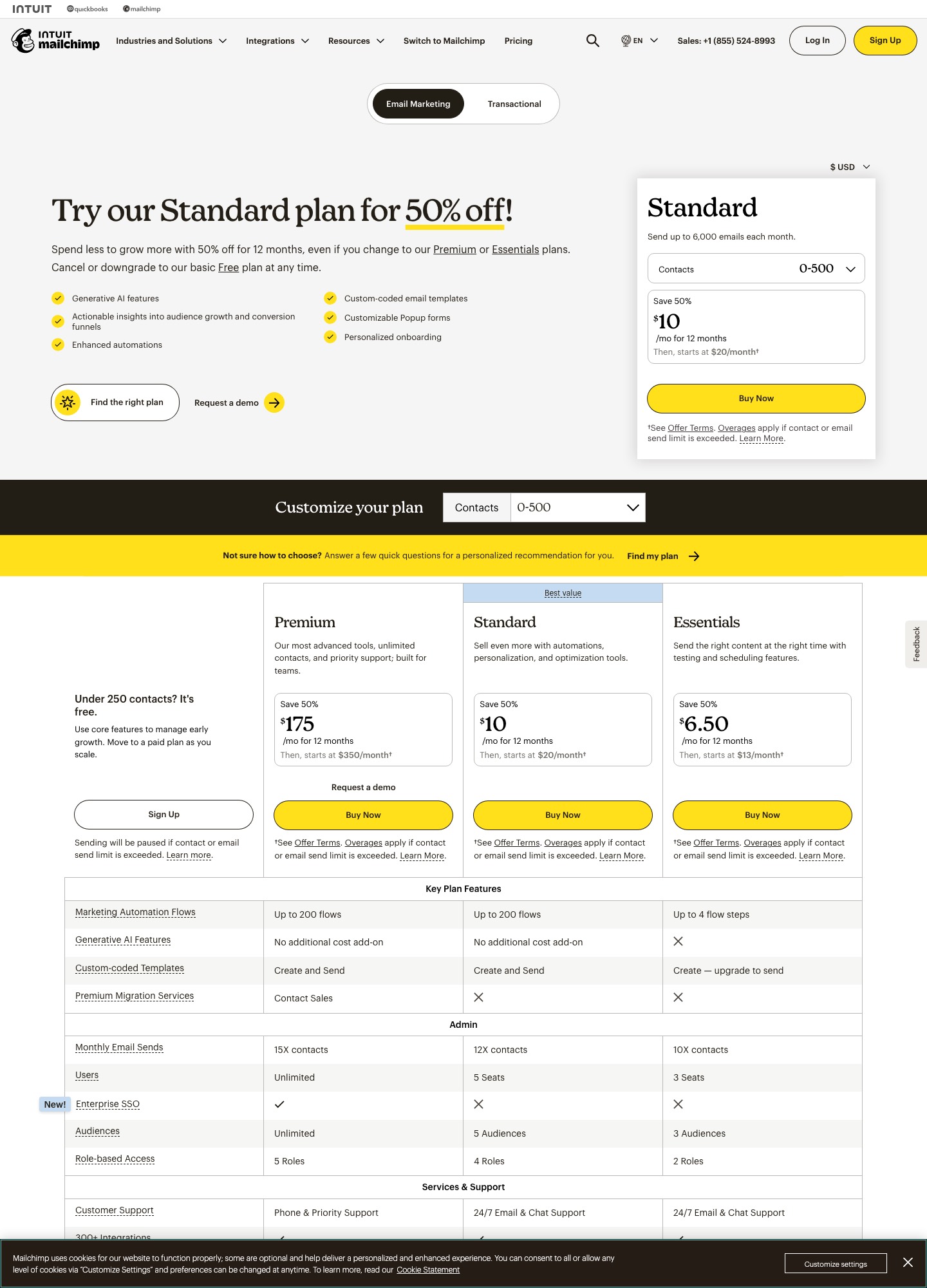
Standard plan cost as the list grows
Mailchimp's monthly plans are not priced per email. They charge for the number of contacts you store, then allow a multiple of that number as monthly sends (its separate Pay As You Go plan, by contrast, sells email credits). The marketing pricing page prints a separate price for each contact band, and each band also shows a 50% first-12-months offer. The list price is what you pay from month 13.
| Contacts | First 12 months | List price after | Send ceiling |
|---|---|---|---|
| 0-500 | $10 | $20 | up to 6,000 |
| 2,501-5,000 | $50 | $100 | up to 60,000 |
| 5,001-10,000 | $67.50 | $135 | up to 120,000 |
| 10,001-15,000 | $115 | $230 | up to 180,000 |
| 20,001-25,000 | $155 | $310 | not shown |
The stops between 500 and 2,500 contacts did not render a price when this page was read, so they are left out rather than guessed. The pattern in the table: a list that grows from 5,000 to 10,000 contacts moves Standard from $100 to $135 at list price, but crossing 10,000 costs another $95 for the 10,001-15,000 band. Essentials is available here only at its 0-500 starting price of $13.
How Mailchimp counts a contact
The pricing plans article defines a contact as an individual member of an audience, and says subscribed, unsubscribed and non-subscribed contacts all count toward your contact total. Archived, cleaned and deleted contacts do not count. The same article defines a send as one email to one contact, so a message to 500 people uses 500 of your sends, and it adds that test and transactional emails count toward the monthly limit too.
What happens at the limit depends on the plan. On Free, exceeding 250 contacts places a hold on sending live and test emails until you upgrade or cut your contacts, though you can still work on drafts and import contacts. On paid plans, going over your contact limit does not interrupt service; the article says an additional charge appears on your bill, and that if the rise is temporary you should shrink the audience and keep the lower total for a full billing cycle to avoid it. The pricing page footnote adds that sending pauses on Free if the contact or send limit is exceeded.
Writing with AI in Mailchimp
Mailchimp's Write with AI article sets four conditions: it is a beta feature, it is included with Standard or higher, it is available to accounts whose primary mailing address is in Australia, Canada, the United Kingdom or the United States, and you should read the Content Generator Beta terms before sending generated content. In the new builder it appears on Paragraph, Heading and Button blocks; in the legacy builder it appears on Text, Boxed Text, Image Card and similar blocks, as Write with AI for new blocks and Edit with AI for existing ones. Prompt starters include "Announcement about" and "Welcome to"; edit options are change tone, shorten, lengthen, fix spelling and grammar, get creative, or a custom instruction.
The same article carries an AI Consent list that matters if you write for regulated topics. Using Mailchimp's generative AI to create or send content related to alcohol, tobacco, weapons, cannabis, vaping, health or financial advice is prohibited, and Mailchimp says it may suspend access to generative AI for breaches. Copy you paste in from another tool is not generated by Mailchimp's feature, but anything you ask Write with AI to produce falls under that list.
Flow templates add a separate path. The AI flow templates article says that feature is beta, needs Standard or higher, requires a US primary mailing address, and requires a connected store such as Shopify, WooCommerce, Square or Stripe. On the assistant side, Mailchimp's AI tools page says connectors for ChatGPT, Claude, Perplexity and Codex are available on Standard and Premium, subject to eligibility.
Getting externally written copy in
Plain text pasted into the builder's text blocks works like any editor, so Essentials users are not locked out of using drafts from Lavender, MailMaestro, Jasper, Copy.ai or a chatbot. Coded HTML is the plan-gated route. Mailchimp's custom HTML template article says Standard or higher can use custom HTML templates, and the pricing page readout shows custom-coded templates as "Create and Send" on Standard and Premium but "Create — upgrade to send" on Essentials.
The paste-in-code article gives the steps: Campaigns, Create, name the email, Use HTML to code my own, hover over Paste in Code and click Apply, then paste and save. Its caveats are specific. Custom-coded templates exist only in the legacy builder, images must be hosted on a public server with absolute links, the |UNSUB| merge tag is required in every email, and free accounts must also include the |REWARDS| referral badge tag. Mailchimp also lets you import a ZIP under 1MB containing a single HTML file, and runs HTML through a validator.
Who should pick Mailchimp, and who should not
Pick Mailchimp if your drafts come out of an AI writing assistant as text and your list is a few thousand contacts that you keep clean. Standard is the plan to price, since both Write with AI and sendable coded templates start there, and Essentials is the one to avoid if either matters.
Look elsewhere if your list is large and mostly dormant, because unsubscribed contacts count and the next band costs real money. MailerLite prices by subscribers with a free tier up to 250, Brevo prices by send volume, and Kit lets a free list grow to 10,000. The method behind these figures is on how we evaluate.
FAQ
Does Mailchimp's free plan include AI writing?
Mailchimp's Write with AI article says the feature is included with Standard or higher, and the pricing page marks generative AI as not included even on Essentials, the paid tier above Free. Free also caps you at 250 contacts and 500 sends a month, with 250 sends a day.
Do unsubscribed contacts raise my Mailchimp bill?
Yes. The plans article counts subscribed, unsubscribed and non-subscribed contacts in your contact total, while archived, cleaned and deleted contacts are excluded. Archiving dormant addresses before you pick a band is the lever the article points to.
Can I paste HTML from another tool into Mailchimp on Essentials?
You can create a custom-coded template on Essentials, but the pricing page says upgrade to send, and the help article says Standard or higher can use custom HTML templates. Plain pasted text in a normal builder block is a different path with no such note.
Is the 50% first-year price permanent?
No. The pricing page prints each offer as a price "for 12 months" followed by "starts at" the list price, for example $50 then $100 at 2,501-5,000 contacts. Budget from the list price if you expect to stay past a year.