Pricing guide
Sequenzy pricing: free for 2,500 emails, $19 a month for 15,000, unlimited contacts
Sequenzy's pricing page lists a free plan of 2,500 emails a month and paid volume stops from $19 for 15,000 emails up to $1,999 for 3,000,000, with unlimited contacts and unlimited sending domains on every plan, because it charges for emails sent rather than for contacts. It is built for SaaS lifecycle email and is not an AI writing assistant. Prices were read on 7 October 2026.
| Emails per month | Monthly price | Yearly total | Twelve months at the monthly price | Yearly saves |
|---|---|---|---|---|
| 2,500 | Free | n/a | n/a | n/a |
| 15,000 | $19 | $205 | $228 | $23 |
| 30,000 | $29 | $313 | $348 | $35 |
| 60,000 | $49 | $529 | $588 | $59 |
| 120,000 | $99 | $1,069 | $1,188 | $119 |
| 300,000 | $199 | Higher stops: 600,000 at $399, 900,000 at $599, 1.2M at $799, 2M at $1,299, 3M at $1,999. Above 3M the page says custom. | ||
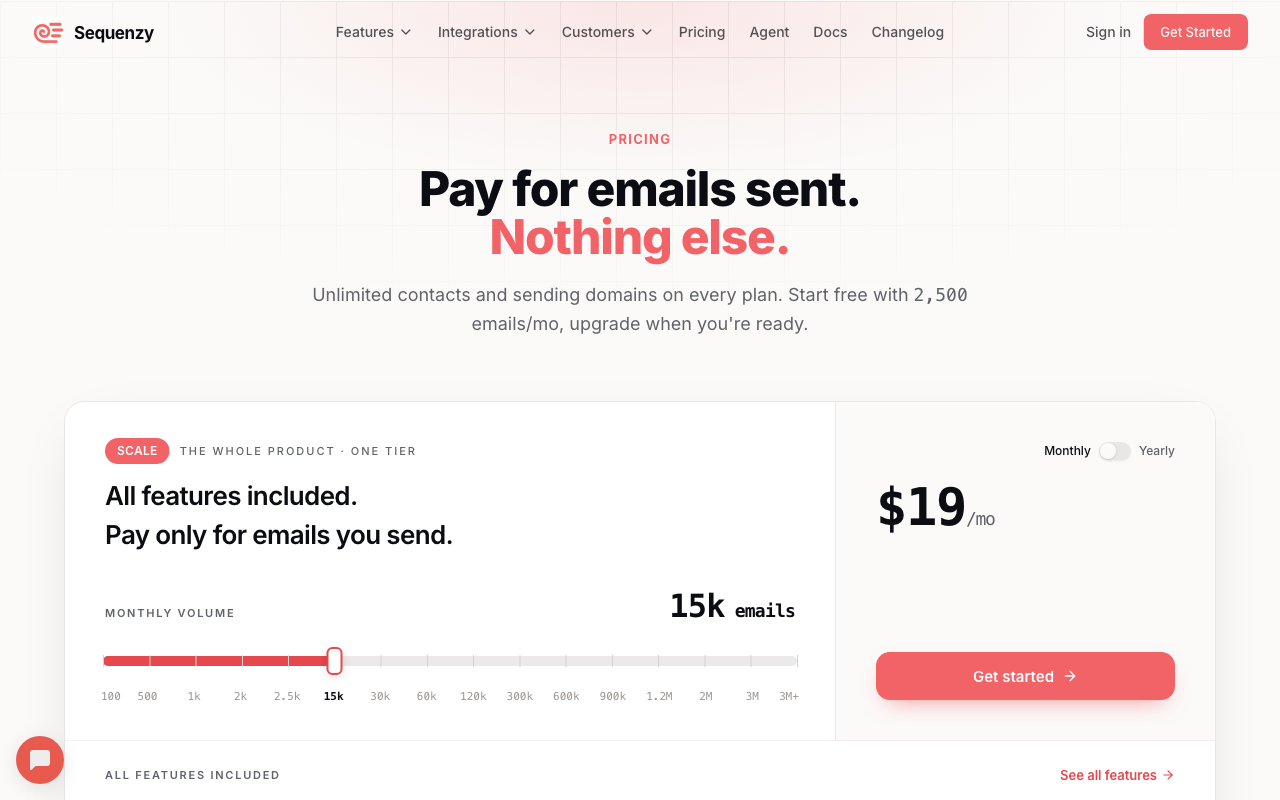
What "pay for emails sent" covers
The page's headline is "Pay for emails sent. Nothing else." Under it, every plan including Free lists unlimited contacts, unlimited sending domains, unlimited team members, unlimited lists and segments, no daily email limit, a visual automation builder, a transactional email API and goal tracking with revenue attribution. The page says all features are included on Free with no card required. Its comparison table has Free, Pro and Enterprise columns, but nearly every row is marked Included on all three; the exceptions, such as removal of the "Sent with Sequenzy" watermark, dedicated IPs and the SMS add-on, start on paid plans.
One optional extra changes the bill. The SMS & MMS add-on, labelled beta, is +$16 a month with 1,000 credits included and is available on any paid plan. The page also labels the WordPress and WooCommerce plugins as beta. The WordPress plugin docs describe the current scope as user sync, registration and profile-update delivery, comment opt-in and connection diagnostics, with no Gutenberg form block yet, and the WooCommerce docs list product, customer and order sync, cart and checkout events and back-in-stock waitlists. Payment integrations named on the page are Stripe, Paddle, Lemon Squeezy, Polar, Dodo Payments and Creem.
Per emails sent against per contact: three scenarios
The useful comparison is not the sticker price but how many emails each subscriber receives. These scenarios use Loops, which charges by subscribed contacts with unlimited sends, and Resend, whose Marketing tab charges by contacts while its transactional tab charges by emails. All prices are stops read from each vendor's own pricing page on 7 October 2026; where a scenario's email volume falls between Sequenzy stops, the next stop up is used.
| Scenario | Sequenzy (emails sent) | Loops (subscribers) | Resend Marketing (contacts) |
|---|---|---|---|
| 10,000 subscribers, four emails each: 40,000 a month | 60k stop: $49 | 9,998 subscribers: $99 | 10,000 contacts: $80 |
| 50,000 subscribers, one email each: 50,000 a month | 60k stop: $49 | 49,989 subscribers: $249 | 50,000 contacts: $250 |
| 10,000 subscribers, one email a day: about 300,000 a month | 300k stop: $199 | 9,998 subscribers: $99 | 10,000 contacts: $80 |
The break-even between Sequenzy and Loops at about 10,000 subscribers falls where Sequenzy's $99 stop (120,000 emails) meets Loops's $99 at 9,998 subscribers: 120,000 divided by 10,000 is 12 emails per subscriber per month. At up to 12 emails per subscriber a month, Sequenzy's matching stop costs $99 or less; above that, Loops's flat $99 wins, as the third row shows. A large list that is mailed rarely, the second row, is where per-email pricing has the widest gap. Resend's Marketing tab lists unlimited broadcast sending at its lower contact stops, and its 10,000-contact readout did not restate that, so check the tab before relying on the third row.
Resend's transactional tab is a different product, a sending API priced by volume: it reads $35 at 100,000 emails and $160 at 200,000, against Sequenzy's $99 at 120,000 and $199 at 300,000. The volumes do not line up exactly, so compare the nearest stops on both pages. If all you need is delivery for messages your own code builds, that is the fairer comparison, and the Resend guide has the full ladder. Sequenzy's price includes the campaign builder, automations and attribution that a plain sending API does not.
Failed payments: what the dunning flow actually uses
Sequenzy's homepage says its Stripe event for a failed invoice starts dunning with a card-update page. The Stripe integration docs explain the mechanism: the saas.payment_failed event carries hostedInvoiceUrl, described as Stripe's hosted invoice page where the customer can pay the invoice or update their card. A recovery email therefore links its button to that URL, written in the docs as {{event.hostedInvoiceUrl}}, and can show the unpaid amount with {{event.amountDueFormatted}}.
Retries are not Sequenzy's. The event reports Stripe's attempt count, nextPaymentAttempt and willRetry, but the retry schedule itself lives in Stripe, or in Paddle for Paddle accounts. The docs recommend filtering on attemptCount equal to 1 so automatic retries of the same invoice do not start a second sequence, and stopping the sequence when a saas.purchase event for that invoice arrives. Neither Sequenzy's pages nor this guide make a claim about how many failed payments any flow recovers.
The AI features, as Sequenzy documents them
Sequenzy's AI features are for writing and running its own sequences. They are not a general drafting assistant that works in your inbox, and they do not replace Lavender, MailMaestro, Jasper or Copy.ai, which the homepage comparison covers. The pricing page's comparison table lists these rows, each marked Included on the Free, Pro and Enterprise columns:
- AI-generated campaigns and AI campaign drafts
- AI-generated email sequences
- Brand voice writing assistance and subject line variants
- An MCP server for AI agents, plus natural-language subscriber operations
- Draft handoff into Sequenzy
The AI campaigns page describes the flow as describe a goal, get content with subject lines and preview text, then review, personalize and schedule, with an option to train the AI on your writing style. The AI sequences page says you describe the goal in plain English and receive a sequence with subject lines, content and timing. The MCP page names Claude.ai, Claude Desktop, Cursor, Codex, Windsurf and OpenClaw as clients, says authentication uses personal API keys, and says drafts land inside Sequenzy for review before anything is enabled or sent. The pages read do not state a usage cap or credit meter for any of these features, and this guide says nothing about how good the output is.
For copy drafted elsewhere, the pricing table lists direct HTML and text sending and template-based sending under the transactional API. The pages read do not describe importing external HTML into a campaign, so check that before you plan to paste an assistant's output into one.
Who it suits, and who should look elsewhere
It suits a software product whose email is triggered by billing and product events, has a long contact list compared with the emails it sends, and wants transactional and lifecycle mail in one account. The numbers in the scenario table are the case for that shape of list, and the free 2,500 is enough to see the flow before paying.
Look elsewhere if you send many emails per subscriber, where Loops prices the audience instead; if you need a delivery pipe, where Resend or the relay tools in the pricing index are priced for that; or if you need deep multi-channel data modelling, which is Customer.io's territory. If your question is about writing assistants, start at the homepage comparison, and see the method page for how this site reads vendor pages.
FAQ
Is Sequenzy free?
The pricing page lists a free plan of 2,500 emails a month with unlimited contacts and sending domains, no card required and all features included. Paid plans start at $19 a month for 15,000 emails.
Does Sequenzy charge per contact?
No. Its pricing page says plans are priced by monthly email volume and that contacts and sending domains are unlimited on every plan. That is the opposite of Loops and Customer.io, which price by subscribers and profiles.
Does Sequenzy send failed-payment emails?
Its Stripe docs describe a failed-payment event that carries Stripe's hosted invoice URL, where the customer can pay or update their card, so a recovery email can link there. Retries of the payment are handled by Stripe or Paddle, not by Sequenzy.
Is Sequenzy an AI writing assistant?
No. It is an email platform for SaaS lifecycle mail that includes AI drafting inside its own campaign and sequence tools. For assistants that coach or draft email in your inbox, see the comparison on the homepage.